Model strategy
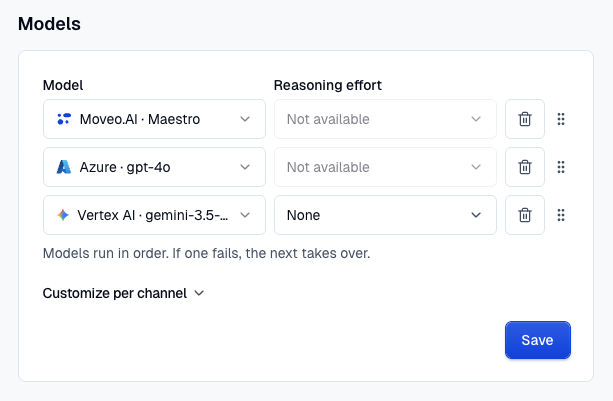
A model strategy defines which language models power your AI Agent. You build a default ordered chain of model steps, and you can optionally override it for individual channels. The AI Agent tries each step in the chain in order and falls back to the next one if a step is unavailable, so a single misconfigured or temporarily unreachable model never takes the agent offline.
You configure the model strategy in the Models section of your AI Agent's Settings page, where it replaces the single language model selector.
How the fallback chain works
A chain is an ordered list of models that run in order — if one fails, the next takes over. When the AI Agent generates a response, it works through the chain from top to bottom:
- It starts with the first model in the chain.
- If that model is unavailable, it moves on to the next one.
- It keeps going until a model succeeds.
The first model is your primary choice, and the models below it act as fallbacks. Reorder them at any time to change which model the agent reaches for first.
Model types
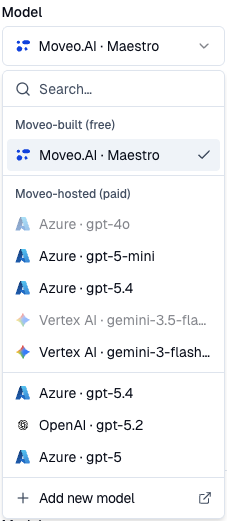
When you add a model, the picker groups the available options into three types. You can mix different types across the models in the same chain.
- Moveo-built (free) — Maestro, Moveo's own built-in model. This is the default option and carries no extra model cost.
- Moveo-hosted (paid) — Third-party models hosted by Moveo (for example, a
gptmodel). Choose one of these when you want a specific model without managing your own provider credentials. - Your models — Models from providers you have connected to your account (BYOLLM). To make your own models available here, connect them first by following the Language Models guide.
Each step uses either a Moveo model or one of your own language models — not both.
Default chain and per-channel overrides
Your default chain applies to every channel. On top of it, you can configure overrides for specific channels when you want different models depending on where the conversation happens:
- Chat
- Voice
A channel without an override inherits the default chain. When you start overriding a channel, it is seeded from the current default so you can adjust from there, and you can reset a channel at any time to go back to inheriting the default.
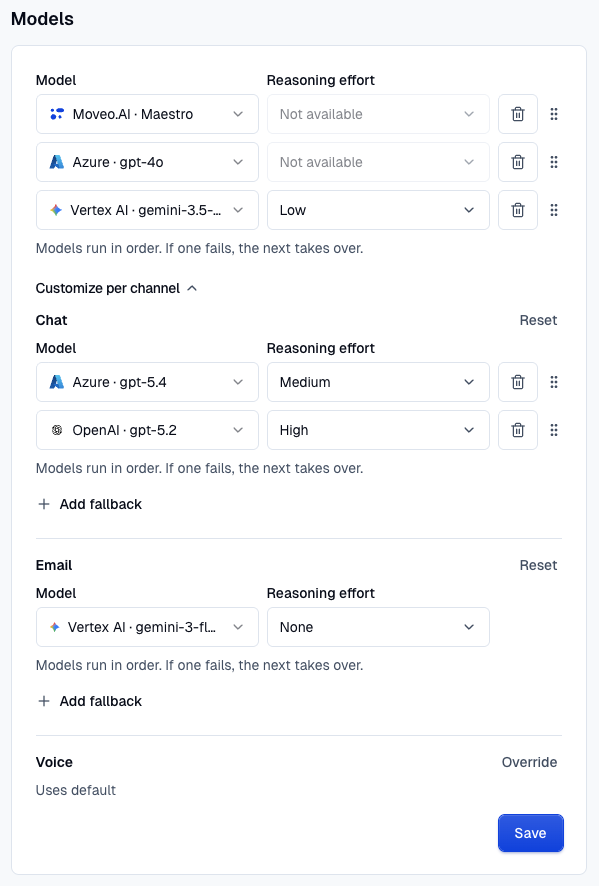
- A chain can have up to 3 models (a primary model plus fallbacks).
- Voice supports a single model only — it does not use fallbacks, because voice interactions are latency-sensitive. When Voice inherits the default, it uses only the default's first model.
Use higher-quality models on channels where response quality matters most, and faster models on latency-sensitive channels such as Voice.
Reasoning effort
Some models support a reasoning effort setting that controls how much the model deliberates before answering. Where a model supports it, you can set the reasoning effort per model — None, Low, Medium, or High — letting you balance response quality against speed and cost. If a model doesn't support reasoning, the setting is shown as unavailable.
High reasoning effort on Voice typically pushes response latency past four seconds. For voice, prefer Medium or Low.
Edit the chain
You can adjust a chain at any time:
- Add a fallback and choose its model.
- Change a model or its reasoning effort.
- Remove a model you no longer need.
- Reorder the fallbacks by dragging them — the new order takes effect immediately.
Test a model
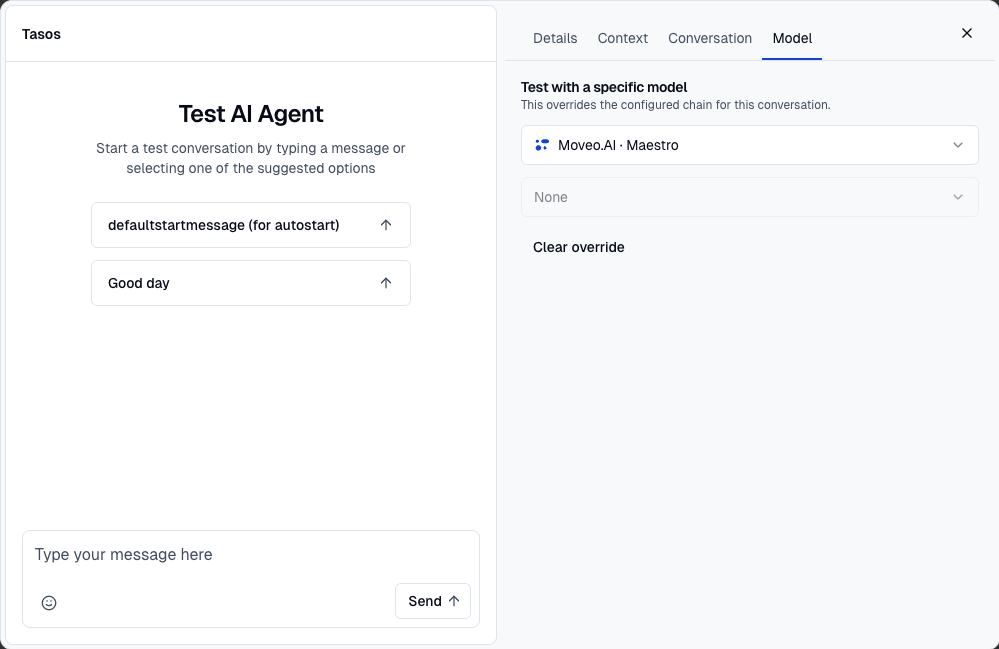
Before committing a model to your chain, you can try it out. In the Test AI Agent panel, open the Model tab and choose a specific model and reasoning effort for the conversation. This overrides the configured chain for that test conversation only, so you can compare how different models respond without changing your live configuration. Use Clear override to go back to the configured chain.
Empty and unavailable states
- Cleared models — If you clear the models, all channels fall back to the default Maestro model.
- Unavailable model — If a model in a chain has been deleted or is otherwise unavailable, it is marked as unavailable and the AI Agent skips it and continues to the next one. Review the chain and replace the affected model to restore your intended configuration.