Voice settings
The Languages card of the AI Agent Settings page sets the languages of the AI Agent. It also sets how a voice AI Agent hears and speaks each language. Speech-to-text (STT) turns the audio of the caller into text. Text-to-speech (TTS) turns the replies of the AI Agent into audio.
The voice settings apply to every voice integration that connects to the AI Agent, for example Twilio Voice, Telnyx Voice, and Web Voice. A voice integration holds only the telephony, for example the phone number and the call recording. You set the voice once on the AI Agent, and every phone line and web widget of the AI Agent uses it. The language model of a call comes from the Voice channel of the model strategy.
Languages
The Languages card has two fields:
- Primary language: the language that you selected at the creation of the AI Agent. You cannot change it. The AI Agent uses it by default.
- Additional languages: the other languages that the AI Agent replies in. Select All languages to reply in the language of the user, whatever it is.
All languages and a list of languages exclude each other. When you select All languages, the console clears the other languages. When you select a language, the console clears All languages.
- Open the Settings page of the AI Agent.
- In the Languages card, open Additional languages.
- Select the languages, or select All languages.
- Click Save.
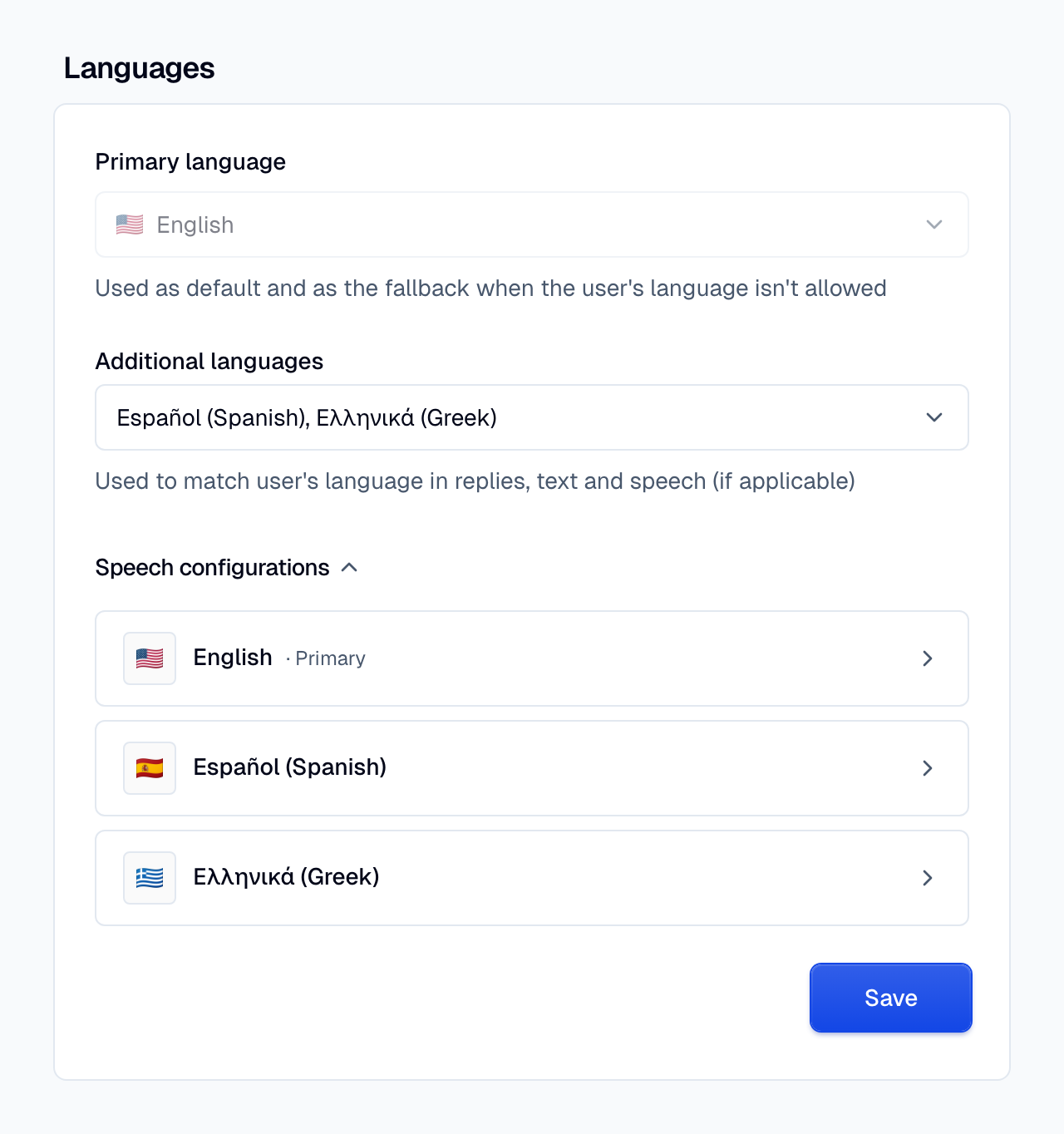
With at least one additional language, the AI Agent detects the language of the user and replies in it. With no additional language, every reply uses the primary language. A language marked Text only has no speech provider. The AI Agent can write it, but a voice AI Agent cannot speak it. See Languages and providers.
Speech configurations
Speech configurations is at the bottom of the Languages card. It lists one row for each language that a voice AI Agent can speak:
- The primary language, marked Primary.
- Each additional language that has a speech provider.
- Each language that still has speech settings but is no longer an additional language. You can then change or clear these settings.
With All languages, the list shows only the primary language and the languages that already have speech settings. A reply in another language uses the Moveo default of that language, or the voice of the primary language. See Default settings.
To set the speech of a language:
- Click Speech configurations to show the list.
- Click the row of the language. A side panel opens, with a Speech-to-text section and a Text-to-speech section.
- In each section, select the Provider.
- Set the provider settings.
- Click Save.
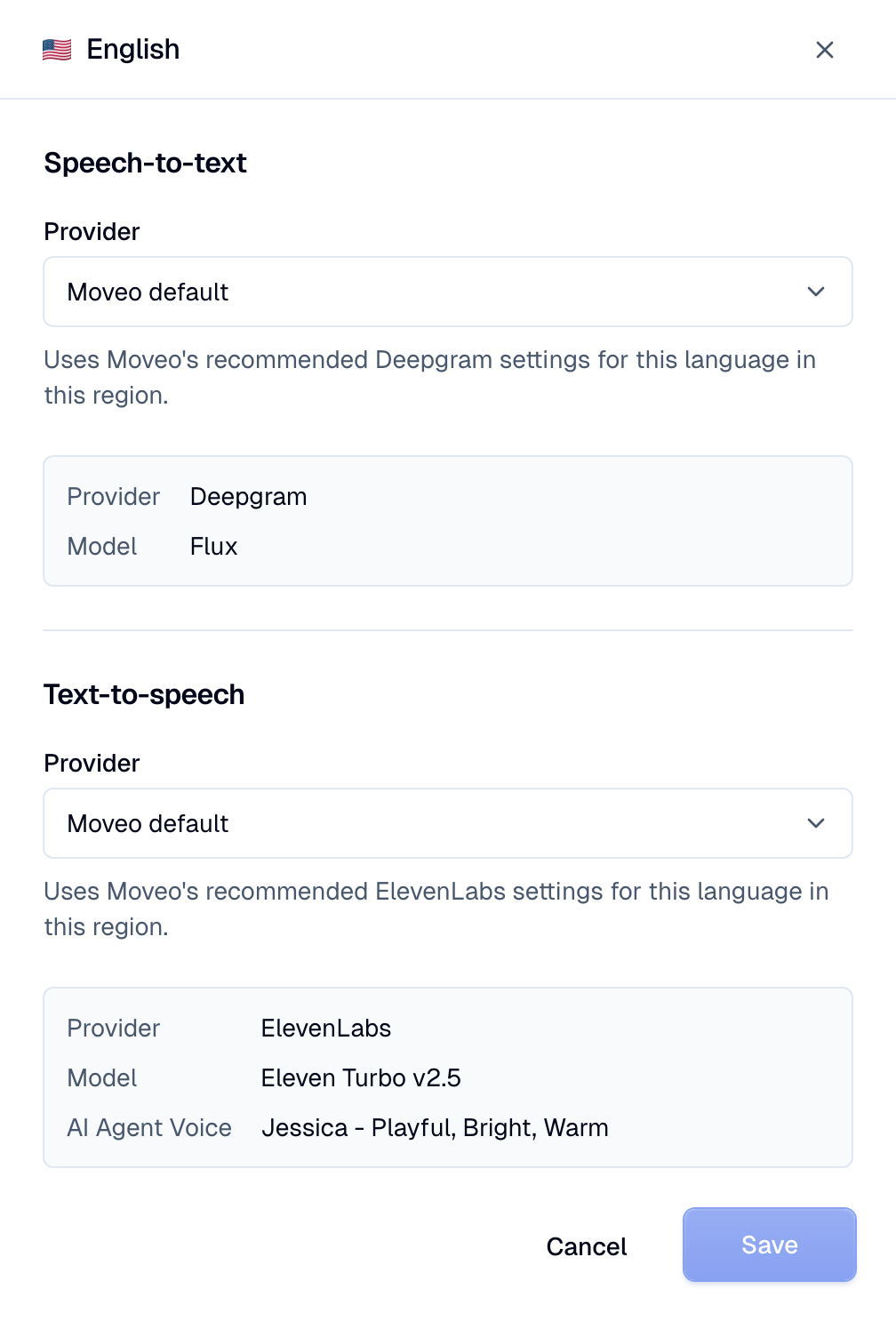
The panel saves only the speech settings. The Save button of the Languages card saves only the languages. If you close the panel or click another row with unsaved changes, the console asks you to confirm.
Default settings
The first option in the Provider list is the default of the language. The option changes with the language and the Moveo region of your account:
| Option | When it shows | What the call uses |
|---|---|---|
| Moveo default | Moveo has a default for the language in your region. | The provider, model, and voice that Moveo recommends for the language. The panel shows them, read-only. |
| Same as the primary language | Moveo has no default for the language, and it is not the primary one. | The settings of the primary language. |
| No default | Moveo has no default for the primary language. | Nothing. Select a provider. The console warns that calls in the language get no voice or transcription. |
A Moveo default uses the key of Moveo, and Moveo can tune it over time. To keep a fixed provider, model, and voice, select them in the row.
The Moveo defaults apply to every language without its own settings, also to a language that is not in the list. To clear the settings of a language, select the default option and click Save.
How a call picks its settings
Speech-to-text is fixed for the call. It connects once, at the start of the call:
- The settings of the primary language, or its Moveo default.
- The settings of the base language, for example
ptforpt-br. - The
*list. You can set it only with the API. - A Moveo platform transcription model that you do not control.
Text-to-speech can change on each reply. Each reply is in one language:
- The settings of the reply language, or its Moveo default.
- The settings of the base language.
- The
*list. - The voice of the primary language.
A * list turns off the Moveo defaults of its kind. See the API reference.
For the providers and the languages of each model, see Languages and providers.
Speech model or Moveo-hosted
After the default, the Provider list has two groups:
- Your speech models, for example
ElevenLabs EU · ElevenLabs. The AI Agent uses the key of your provider account, and your provider bills you for the audio. To add one, click Add new speech model, or see Speech models. - Moveo-hosted, for example
Cartesia (Moveo). The AI Agent uses the key of Moveo. The group shows only the providers that Moveo hosts in your region for the kind of the section.
Each section shows only the providers that support its kind. For example, Soniox shows only under Speech-to-text. Cartesia, Rime, and Google show only under Text-to-speech. Deepgram shows in both sections. The text under the Provider list tells you whose key the row uses.
Provider settings
After you select a provider, the section shows the settings of that provider.
- Text-to-speech has a Model and an AI Agent Voice. Each provider adds its own delivery settings, for example Speed, Stability, and Similarity for ElevenLabs. For ElevenLabs, use Test voice to hear the voice before you save.
- Speech-to-text has a Model, and the settings of that model, for example keywords. It also holds the turn-detection settings of the model. These settings find the end of the caller turn. See Turn-taking.
Each section shows only the models that support its language. For example, a Spanish Deepgram
speech-to-text section does not show the English-only flux-general-en model.
The voice list depends on the provider and the key:
- An ElevenLabs speech model lists the voices of your own ElevenLabs account, including your cloned voices.
- A Cartesia or MiniMax speech model lists the voices of Moveo. Select a voice that your account can use.
- Deepgram, Rime, and Google have no voice list. Type the voice ID in AI Agent Voice. The
Voice library link opens the voices of the provider. Deepgram and Google voice IDs include the
language, for example
thalia-enanden-US-Chirp3-HD-Charon. - Rime also has a Language setting. Provider default leaves the choice to Rime.
If you do not change a setting, the provider default applies. For ElevenLabs, Moveo sets Stability to 0.85 and Similarity to 0.75. To fix how the AI Agent says or hears names and numbers, see Pronunciation and speech control.
Versions and export
Voice settings are part of the AI Agent. When you publish the AI Agent, the new version keeps the current voice settings. An export includes the voice settings. An import drops a step whose speech model is not in the account.
Permissions
To see the voice settings, a role needs Read only or Can edit on the AI Agents group. To
change them, the role needs Can edit. See Roles and permissions.
An API key needs the manage scope.
API reference
The REST API manages the voice settings of an AI Agent as its speech strategy:
GET /v1/brains/{brain_id}/speech-strategyreturns the voice settings.PATCH /v1/brains/{brain_id}/speech-strategyreplaces all the voice settings.DELETE /v1/brains/{brain_id}/speech-strategyremoves all the voice settings.
The strategy has an stt and a tts object. Each object maps a language code to a list of steps. A
step names a provider, a speech_model_id (null for Moveo-hosted), and the provider config.
The languages of the AI Agent are the supported_languages field of the AI Agent.
{
  "stt": {
    "en": [{ "speech_model_id": null, "provider": "soniox", "config": { "model": "stt-rt-v5" } }]
  },
  "tts": {
    "en": [
      {
        "speech_model_id": "0c733b1d-0af0-4fec-9064-176d10a0c0c8",
        "provider": "elevenlabs",
        "config": { "model_id": "eleven_flash_v2_5", "voice_id": "21m00Tcm4TlvDq8ikWAM" }
      }
    ]
  }
}
A text-to-speech step needs model_id and voice_id. For Deepgram, Rime, and Google, the config
has only model_id, voice_id, and, for Rime, language_code.
GET /v1/speech-models/providers returns the Moveo defaults of your region in defaults. At the
start of a call, each language without its own list takes its Moveo default. The * key is a list
for every language without a list of its own. A * list turns off the Moveo defaults of its kind,
for every language. Set a list for the primary language instead of *. When you save the primary
language in the console, the console moves an old * list to the primary language.
A list can have up to three steps. In a tts list, the steps after the first are fallbacks. If a
step fails during a call, for example because the provider rejects the key or the voice, the next
step speaks. The AI Agent repeats the part of the reply that the caller did not hear. The failed
step stays out for the rest of the call. When a list has no step left, the * list speaks, then the
voice of the primary language. A stt list uses only its first step.
The console edits only the first step of each language, and it keeps the other steps. See Replace the speech strategy for the full schema and the errors.