Simulations
Simulations are regression tests for your AI Agent. Describe a conversation in plain language, describe what success looks like, and Moveo runs the whole multi-turn conversation for you. The conversation goes through the same pipeline that serves your customers, and you get a pass or fail verdict with written reasoning.
This turns agent changes from guesswork into something you can verify. Write 10 to 20 simulations covering the behavior you care about most, run them after every change, and you know within minutes whether you broke anything.
Simulations require a paid plan. Trial accounts see an upgrade prompt instead of the feature.
How a simulation works
Each simulation runs as a three-part loop:
- A simulated customer plays the role you described in the scenario. It sends one message at a time and stays in character.
- Your AI Agent answers through its real pipeline, using the same knowledge base, guidelines, dialogs, tools, and webhooks it uses in production.
- An evaluator reads the finished conversation and grades it against your success criteria, then explains its verdict.
The conversation ends when the simulated customer has nothing left to say, or when the turn limit is reached.
Create a simulation
- Go to AI Agents.
- Select the AI Agent you want to test.
- Open Simulations.
- Click Create.
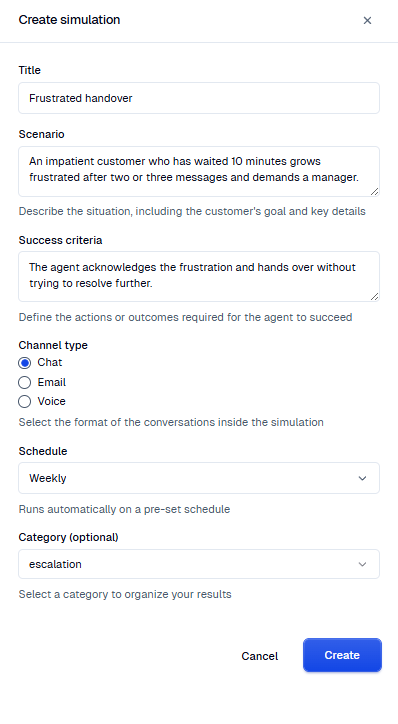
- Fill in the fields described in the following table.
- Click Create to save it. When Schedule is Not set, you can click Create & Run instead to save the simulation and run it immediately.
| Field | What to enter |
|---|---|
| Name | A name that describes the purpose of the test. Names are unique per AI Agent. |
| Scenario | The situation, including the customer's goal and key details. |
| Success criteria | The actions or outcomes required for the agent to succeed. |
| Initial context | A JSON object with the context variables that the conversation starts with. |
| Channel type | The format of the conversation: Chat, Email, or Voice. |
| Schedule | How often the simulation runs on its own. Leave it as Not set to run it manually. |
| Category | An optional label that groups and filters your results. |
As you type, Moveo reviews your draft and suggests improvements, such as tightening success criteria that are too vague to grade. The suggestions are advisory and never block you from saving.
Create a simulation from a test conversation
You can turn a test session in Try It into a simulation. The new simulation starts with the context variables of the test session, so you do not type them again.
- Open your AI Agent and click Test → Test with Moveo.
- Chat with your AI Agent and set the context variables you need.
- Open the Context tab.
- Click Create simulation below the context variables. The Simulations list opens in a new tab with the create panel open.
- Review the fields, then click Create.
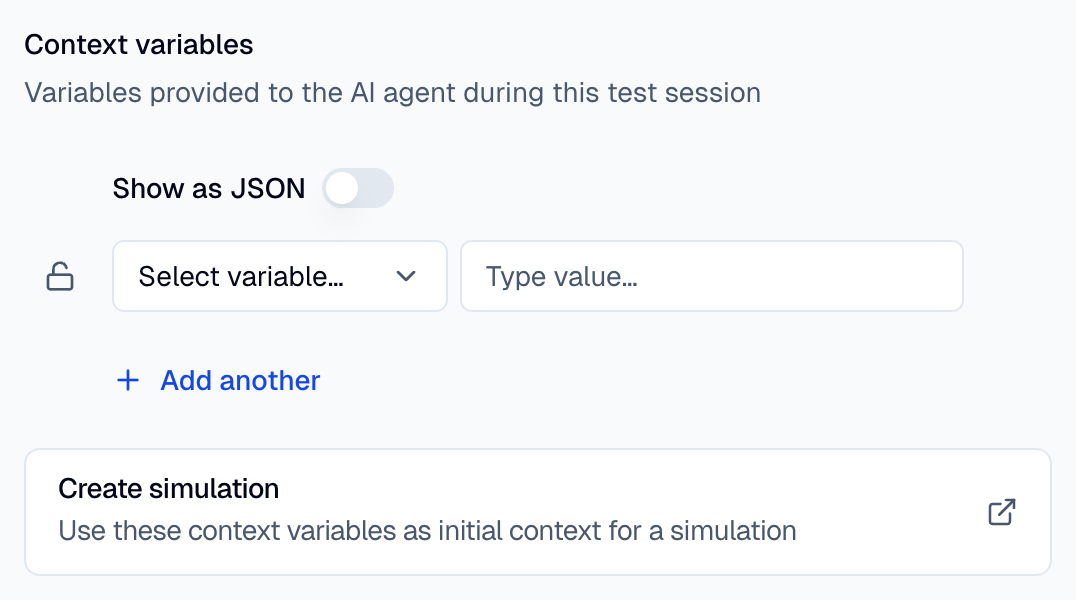
The Initial context field holds the context variables of the test session. Tags are not included.
Moveo can also draft the Name, Scenario, and Success criteria from the transcript. To do this, the AI Agent must answer at least two customer messages in the test session. Review the draft and edit it before you save. If another simulation already uses the drafted name, Moveo adds a number to it. When the conversation is too short, a message tells you so. You then fill in the fields yourself. If the draft fails, a Manual setup required message appears and the fields stay empty.
Write an effective scenario
The scenario describes both what happens and who the customer is. The simulated customer plays that role, so the more specific you are, the more realistic the conversation. Useful details include:
- The customer's goal — "wants to deposit money", "asking about loan rates", "closing their account".
- Personality and emotional state — "frustrated", "polite and elderly", "panicked after losing their card".
- Language — "writes entirely in Greek", "starts in English, then switches to Spanish".
- Domain context — "owes $5,000", "long-time customer unhappy with a fee increase".
- Conversation dynamics — "after three messages they get impatient and ask for a human".
- Adversarial behavior — jailbreak attempts, social engineering, or heavy typos.
The simulated customer also receives a summary of your agent's configuration, including its name, goal, and default language. Its messages therefore read as realistic against that specific agent.
Write effective success criteria
The evaluator grades the conversation against your wording, so describe observable behavior rather than a general impression.
The evaluator reads the full transcript and structured data collected during the run: which tools the agent invoked, which webhooks fired, whether the conversation was handed over to a human, whether the agent ever fell into an unknown or fallback response, and the final session context. That means criteria can assert on far more than the words in a reply:
| What you want to check | Example criteria |
|---|---|
| A specific answer | "The agent states that the current interest rate is 4.2%." |
| A behavior | "The agent hands over when the customer explicitly asks for a human." |
| Language compliance | "The agent responds in Greek throughout." |
| Tool usage | "The agent calls get_account_balance before answering." |
| Webhook usage | "The agent triggers the know your customer (KYC) webhook before confirming the transfer." |
| Containment | "The conversation is never handed over to a human." |
| Coverage | "The agent never falls back to an unknown response." |
| Flow adherence | "The agent acknowledges, offers alternatives, and only closes if the customer insists." |
| Refusals | "The agent refuses to share internal system details." |
| Context variables | "The user_tier context variable holds the customer's tier by the end." |
"The agent responds well" cannot be graded, because nothing in the transcript proves it. Rewrite vague criteria as a concrete action or outcome, such as "The agent retrieves the balance and offers a payment plan."
Run simulations
Run simulations from the Simulations tab in any of these ways:
- Open the actions menu on a row and choose Run to run that one simulation.
- Select several rows with their checkboxes, then click the run button to run the selection.
- Click Run all to run every simulation on the AI Agent.
A notification confirms the run has started and tells you it is usually done within minutes. A second notification arrives when the run finishes, even after you navigate elsewhere.
To stop a run that is still going, open its actions menu in the Runs tab and choose Stop. Stopping cancels the remaining simulations and cannot be undone.
Schedule runs
Set the Schedule field on a simulation to run it automatically:
| Cadence | When it runs |
|---|---|
| Weekdays | Monday to Friday at 09:00 UTC |
| Weekly | Every Monday at 09:00 UTC |
| Monthly | The first day of each month at 09:00 UTC |
Simulations that share a cadence run together in one scheduled run. Set the field back to Not set to remove a simulation from its schedule.
Read the results
The Runs tab lists every run with its date, status, success rate, number of simulations, number of failures, duration, and what triggered it. Filter by status, trigger, or date range to narrow the list.
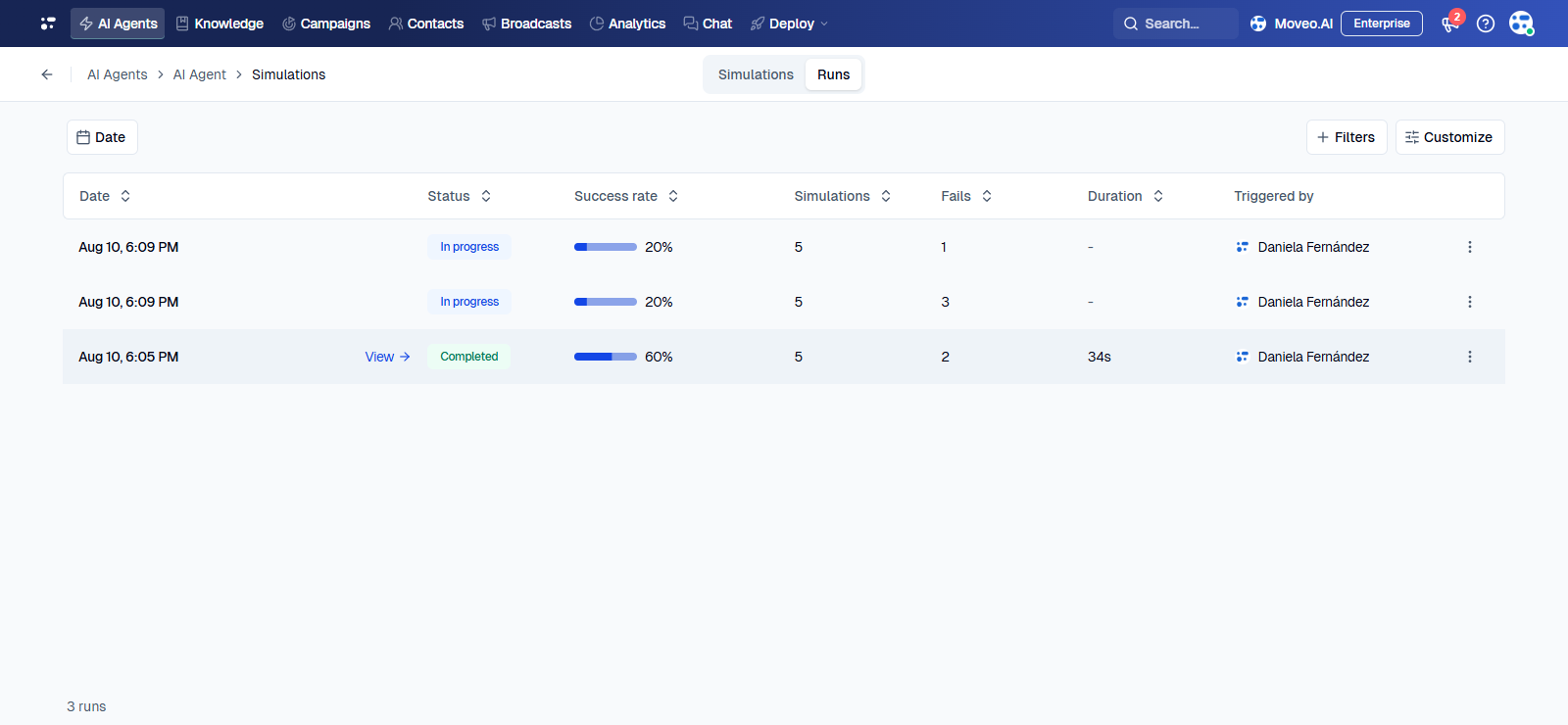
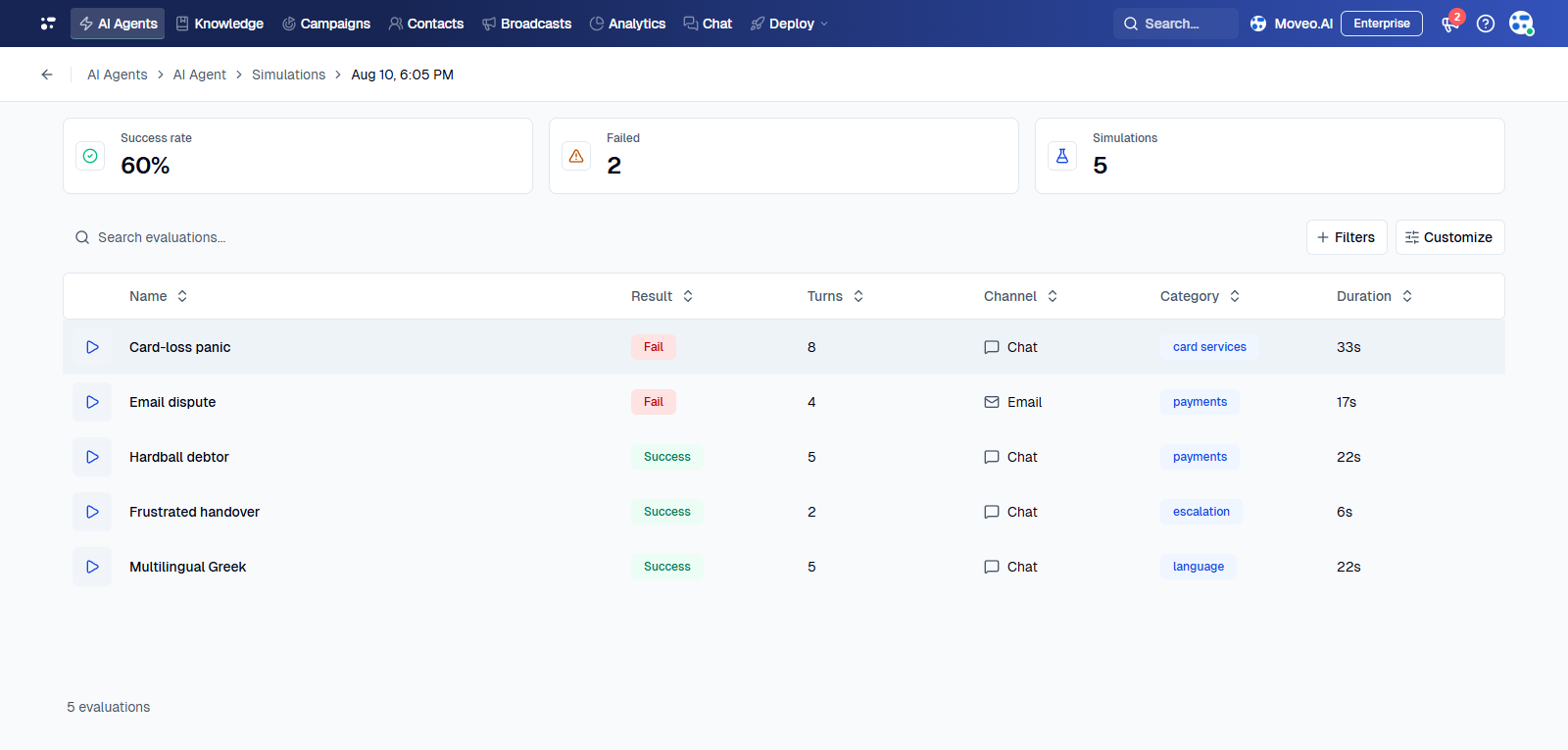
Open a run to see a summary of its success rate, failure count, and total simulations, followed by a table of results. Each row shows one simulation and its result:
| Result | Meaning |
|---|---|
| Success | The agent met your success criteria. |
| Fail | The agent did not meet your success criteria. |
| Error | The simulation could not complete. |
| Pending | The simulation is queued. |
| In progress | The simulation is running. |
Click Preview on a row to replay the conversation turn by turn. The panel alongside it holds five tabs:
- Results — the verdict and the evaluator's written reasoning, together with the scenario and pass condition used for the run.
- Details — what the agent did on the selected turn.
- Context — the context variables at the selected turn.
- Conversation — the conversation ID, request ID, channel, turn count, and duration.
- Insights — click Generate insights to run the insights configured on your AI Agent against this transcript.
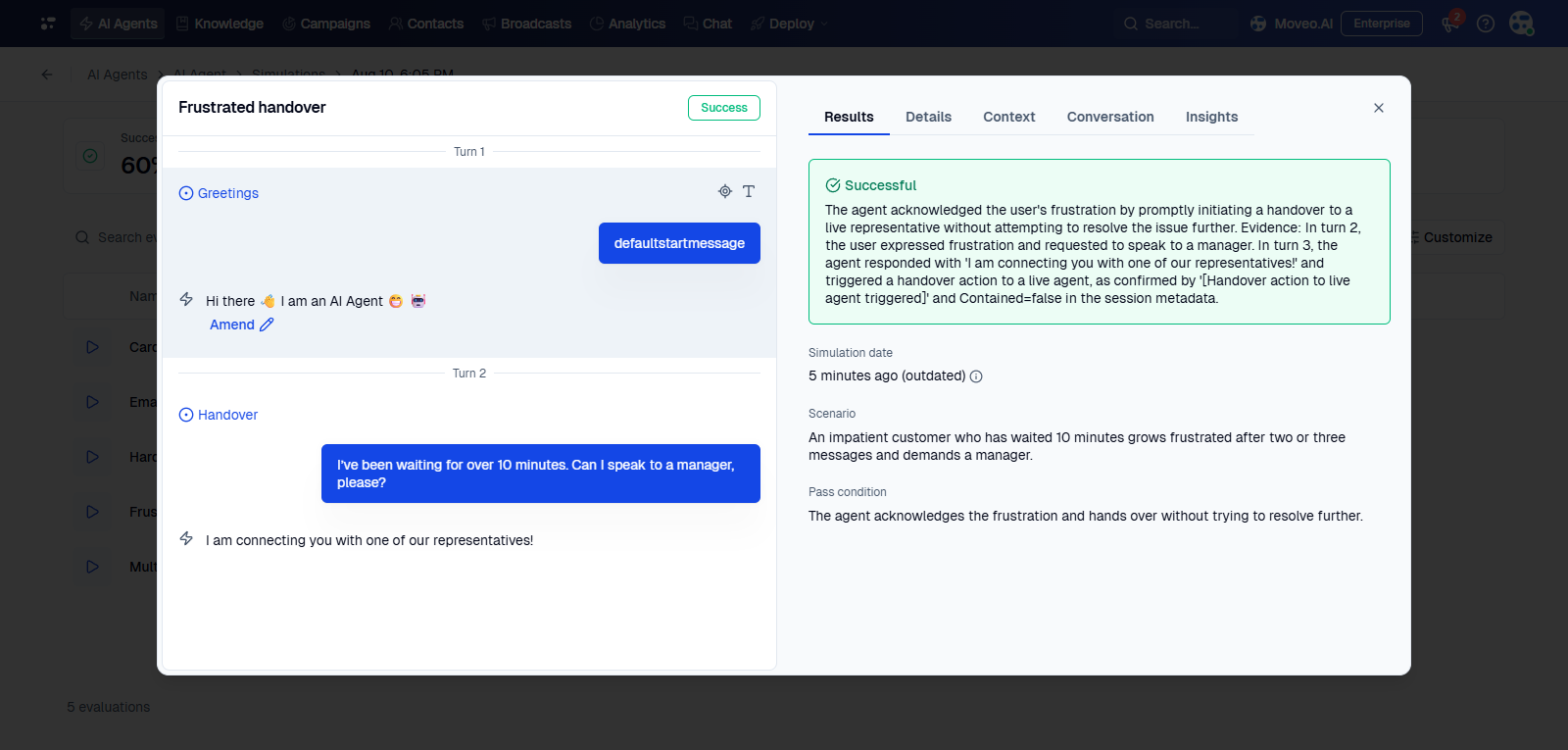
The evaluator's reasoning points at specific turns, so a failure tells you what to fix: a guideline, a dialog flow, a knowledge base document, or a tool.
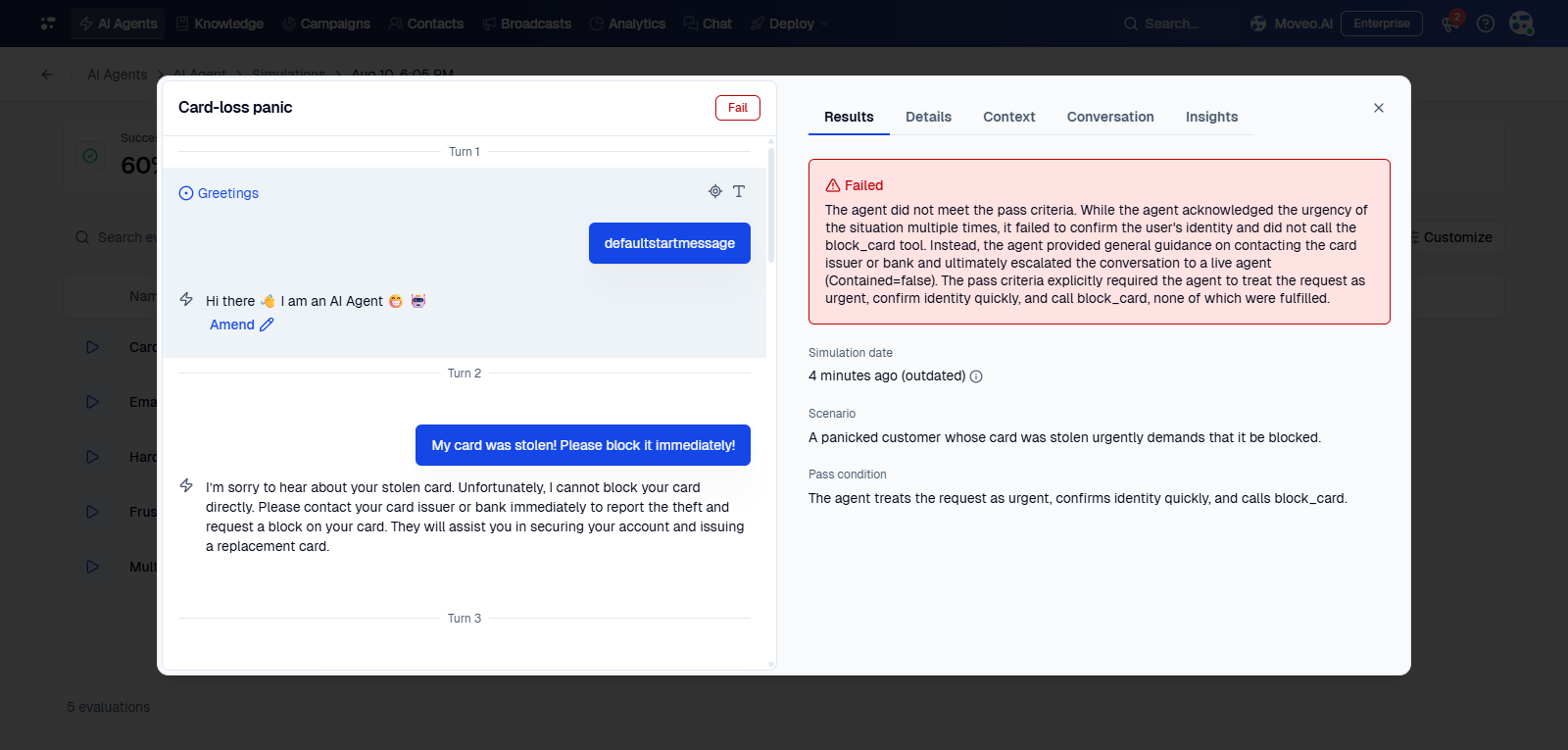
A run shows an (outdated) marker when the simulation changed after the run finished. Run it again to grade your agent against the current wording.
Examples
| Name | Scenario | Success criteria | Channel |
|---|---|---|---|
| Frustrated handover | An impatient customer who has waited 10 minutes grows frustrated after two or three messages and demands a manager. | The agent acknowledges the frustration and hands over without trying to resolve further. | Chat |
| Card-loss panic | A panicked customer whose card was stolen urgently demands that it be blocked. | The agent treats the request as urgent, confirms identity quickly, and calls block_card. | Chat |
| Multilingual Greek | A Greek-speaking customer writes entirely in Greek to ask about loan rates. | The agent responds in Greek with accurate information from the knowledge base. | Chat |
| Hardball debtor | An aggressive customer who owes $5,000 refuses to pay and threatens legal action. | The agent stays calm, empathizes, and presents installment options without being confrontational. | Chat |
| Email dispute | A customer sends a formal email disputing a $150 charge from an unrecognized merchant. | The agent acknowledges the dispute, explains the investigation timeline, and starts the dispute flow. |