Debts
Overview
A debt is a balance that a person owes, such as a credit card balance or a loan. Payment recovery campaigns create debts from the uploaded audience, and the AI Agent updates them during conversations. Each debt links to one or more contacts, called parties.
The Debts page lists every debt in the account in one table. It includes debts that no longer have a party. To see the debts of one person instead, open the contact and select the Debts tab. See Contacts.
Open the Debts page
Debts shows in the main navigation only for an account with at least one debt. You can also open
it from the command palette. To see the page, a member needs the Contacts group at Read only
or higher and the debts.read permission. See
Debt permissions.
Find a debt
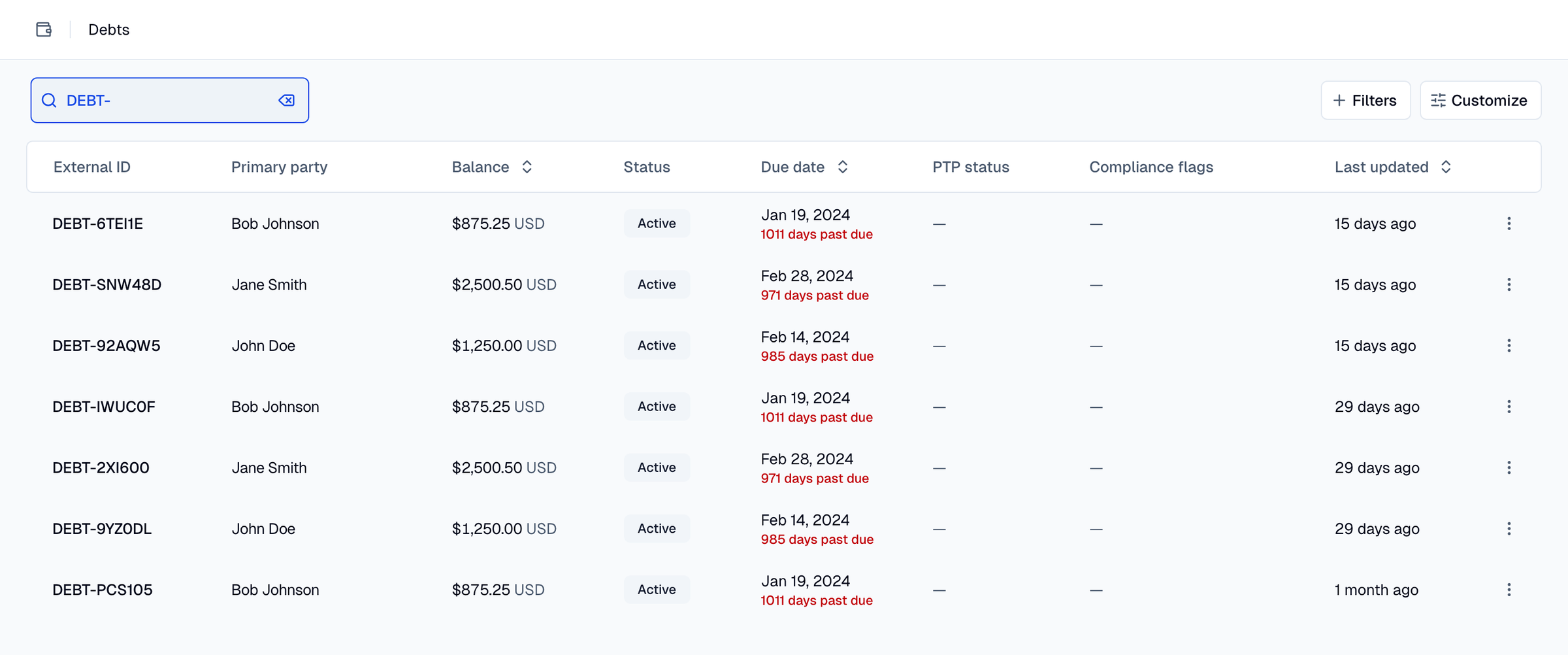
Use the search bar to find a debt by its external ID or by the name of a linked contact. The search ignores case and matches part of a value.
Use the filters to narrow the list:
- Status: Active, Paid, Settled, Disputed, Legal, Charged off, or Bankruptcy.
- PTP status: The state of the promise to pay (PTP). The values are None, Promised, Kept, and Broken.
- Has compliance flag: Yes or No.
- Has party: Yes or No. Select No to find the debts without a linked contact.
The list shows the newest debts first. To sort by Balance, Due date, Created, or Last updated, click the column header. To show or hide columns, use the column menu. Original balance, Type, Creditor, and Created are hidden at first.
Read a debt
Each row shows these columns by default:
- External ID: The identifier of the debt in the system of the creditor.
- Primary party: The primary borrower, or the first linked contact. The name links to the contact. A debt without a contact shows No party.
- Balance: The amount owed today, with its currency.
- Status: The status of the debt.
- Due date: The due date. For an active debt, the cell also shows the days past due.
- PTP status: The state and the date of the promise to pay.
- Compliance flags: The flags set on the debt.
- Last updated: The time of the last change to the debt.
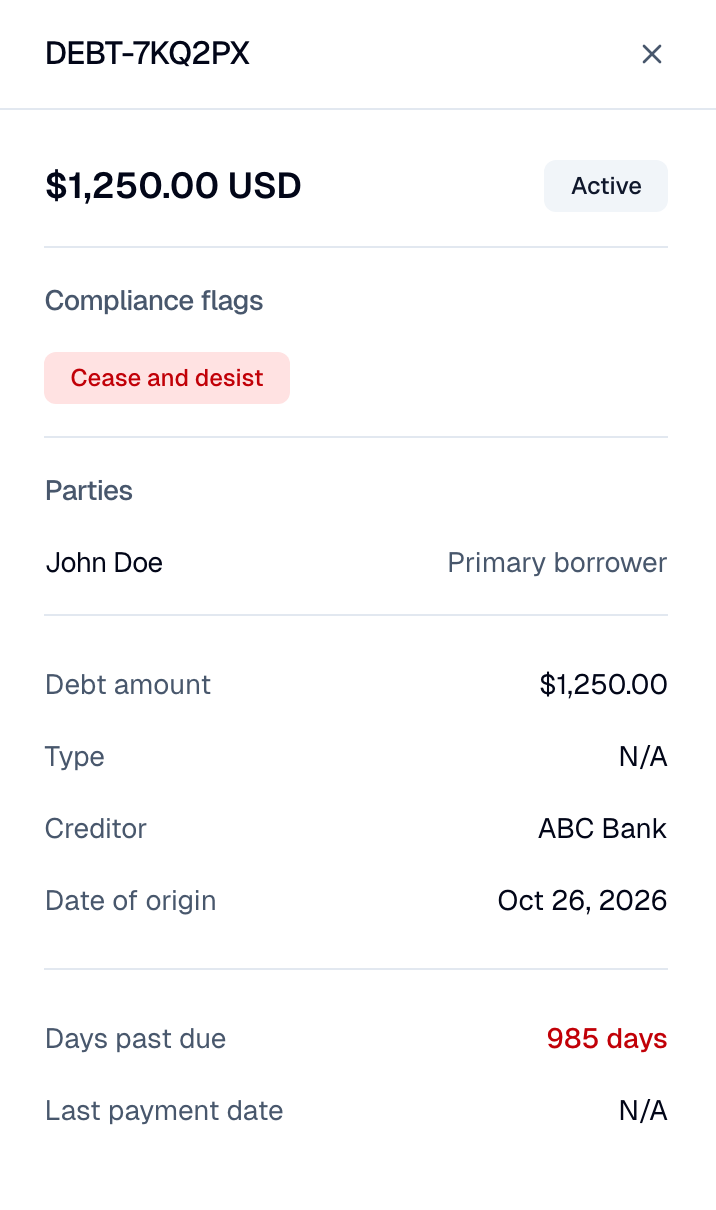
Click a row to open the detail panel. The panel shows the balance and the status, the Compliance flags, and the Parties with their roles. A party is a Primary borrower, a Co-borrower, a Guarantor, or an Authorized contact. The panel also shows the debt details and the payment details, such as the promise to pay, a payment plan, or a settlement offer.
Compliance flags
A compliance flag records a fact that limits collection on a debt. The AI Agent sets a flag during a conversation. For example, it sets Disputed after the person disputes the debt. A compliance profile then stops or limits contact about that debt.
| Flag | Meaning |
|---|---|
| Cease and desist | The person asked Moveo to stop contact. |
| Disputed | The person disputes the debt. |
| Coerced debt | The person says that someone forced the debt. |
| Refusal to pay | The person refuses to pay. |
| Fraud or identity theft | The person reports fraud or identity theft. |
The AI Agent can set a flag but cannot clear it. To clear a flag through the API, a member needs
debts.delete.
Delete a debt
- Go to Debts.
- Click the actions menu on the row and select Delete.
- If the debt has a compliance flag, select Delete even if the debt has compliance flags.
- Click Delete.
Without that option, Moveo refuses to delete a flagged debt and shows an error. The delete also
removes the links between the debt and its contacts and campaigns. The contacts stay. To delete a
debt, a member needs debts.delete.
You cannot restore a deleted debt. A compliance flag can record a legal request, such as a cease and desist. Keep a flagged debt unless you are sure that you do not need the record.
A contact delete can also delete debts. See Delete a contact.
Manage debts with the API
The debts API works at the account level, under /v1/debts. It replaces the earlier debt routes
under a contact. Only the list of the debts of one contact stays under
/v1/contacts/{contact_id}/debts.
| Request | What it does |
|---|---|
GET /v1/debts | Lists the debts of the account, with the same filters as the Debts page and a contact_id filter |
GET /v1/debts/{debt_id} | Returns one debt with its parties |
PATCH /v1/debts/{debt_id} | Changes the status or the compliance flags of a debt |
DELETE /v1/debts/{debt_id} | Deletes a debt. A flagged debt needs force=true |
PUT /v1/debts/{debt_id}/parties/{contact_id} | Links a contact to the debt with a role, or changes the role |
DELETE /v1/debts/{debt_id}/parties/{contact_id} | Removes the link between a contact and the debt |
A request to delete a flagged debt without force=true returns 409 with the code
contact-has-flagged-debts. A PATCH request accepts only status and the compliance flags. The
balance, the creditor, and the other fields come from the subscriber upload. See
Payment recovery campaigns.