Account
Set up your account
To create an account on Moveo, follow these steps:
- Sign up at the Moveo Console.
- Enter your company email address or log in with your Google credentials.
- If you sign up with an email, Moveo sends a verification link to your inbox. Select it without closing the original tab.
- In the new tab, enter the verification code that Moveo provides.
- Complete the introductory guide.
- Start using your account.
Explore the prebuilt templates in the Moveo Console to learn the platform.
Account ID
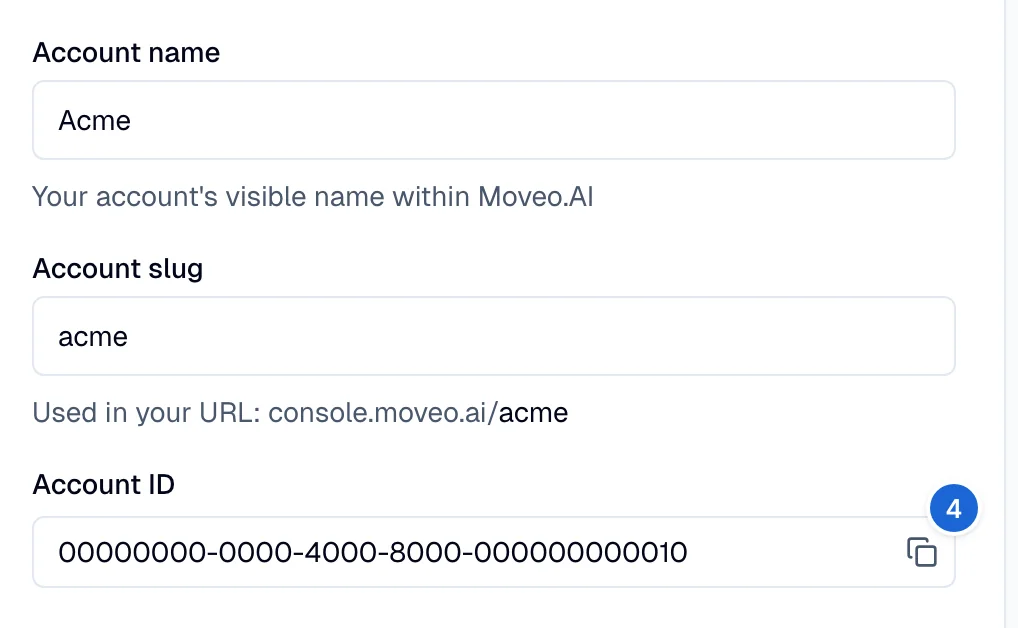
The Account ID is the unique identifier of your account in Moveo. You need this ID to integrate your account with other services such as Zapier. To find your Account ID:
- Select your avatar in the upper-right corner.
- Select Your profile.
- In the left sidebar, at the top, go to Account → General.
- At the bottom, copy the Account ID.
Data privacy
The Use data and analytics setting controls whether Moveo stores conversation data for analytics. The setting is on by default. Only an account owner can change it.
To stop the analytics data for your account:
- Select your avatar in the upper-right corner.
- Select Your profile.
- In the left sidebar, go to Account → Data privacy.
- Turn off Use data and analytics.
- Select Save.
When the setting is off:
- Moveo does not store the messages, ratings, and insights of new conversations in analytics. These conversations do not show in any analytics page, report, or log.
- The Analytics pages and the Conversations page of each AI agent show Analytics page is not available. An account owner also sees a link to the Data privacy page.
- The change applies to conversations that start after you save it. Moveo does not delete the analytics data that it stored before the change.
When you turn the setting on again, Moveo stores the data of new conversations again. The conversations from the period when the setting was off do not show in analytics.
A web client can also turn off analytics for one conversation. Set opt_out to true in the
session:create event.
Expired account
When your trial or plan expires, this message appears at the top of your Moveo console.


To extend your trial period, send an email to the support team with the reason for the extension and your account ID. To find the account ID, go to the settings of your account, then select General.