Speech models
A speech model is a named API key for one speech provider, for example "ElevenLabs EU". A voice AI Agent uses a speech-to-text (STT) model to transcribe the caller and a text-to-speech (TTS) model to speak. With a speech model, the AI Agent uses your provider account for this audio, and your provider bills you for it.
You add a speech model once for the account. Then every AI Agent in the account can use it in its voice settings. You do not copy the same key into each voice integration. One key reaches every model and every voice of the provider.
Supported providers
You can add a speech model for these providers:
| Provider | Speech-to-text | Text-to-speech | Key |
|---|---|---|---|
| ElevenLabs | Yes | Yes | API key |
| Cartesia | No | Yes | API key |
| MiniMax | No | Yes | API key |
| Soniox | Yes | No | API key |
| Deepgram | Yes | Yes (Aura-2) | API key |
| Rime | No | Yes (Coda, Mist v3) | API key |
| No | Yes (Chirp 3: HD) | Service account (API only) |
One Deepgram key serves both speech-to-text and text-to-speech. For the models and languages of each provider, see Languages and providers.
Add a speech model
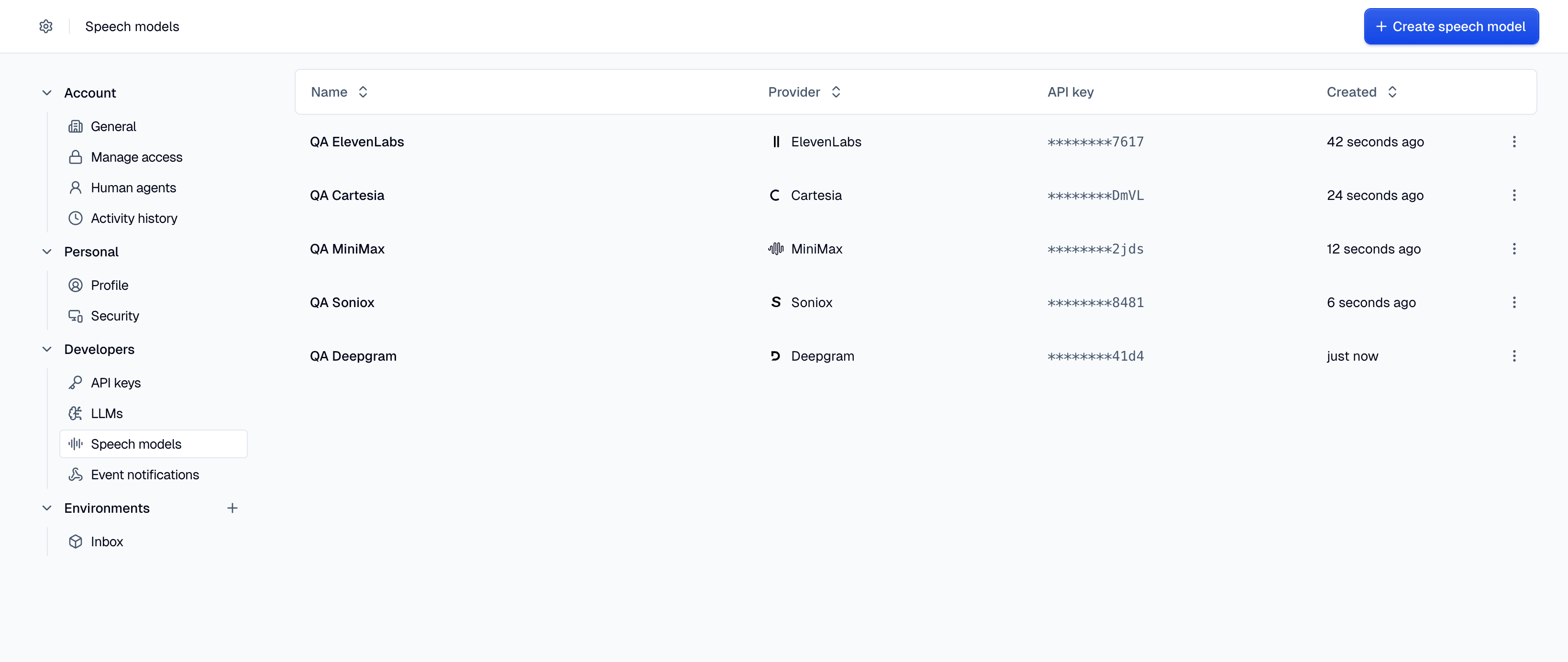
- Go to Settings → Developers → Speech models.
- Click Create speech model.
- Enter a Name for the speech model. The name must be unique in the account.
- Select the Provider.
- Enter the API key of your provider account.
- For ElevenLabs, select the Region of your ElevenLabs account:
global,eu, orin. - Click Create.
The console holds one speech model for each provider. In the Provider list, a provider that already has a speech model is not available. To use a different key for that provider, edit the existing speech model. The API does not have this limit. With the API, you can add several speech models for the same provider, for example an EU key and a US key.
Add a Google speech model
Google Cloud Text-to-Speech takes a service account, not an API key. The console has only an API key field, so add a Google speech model with the API:
- In Google Cloud, turn on the Text-to-Speech API in the project of the service account.
- Create a JSON key for the service account.
- Send
POST /v1/speech-modelswith"provider": "google". Put the full JSON key, as a string, inconfig.credentials.
{
  "name": "Google TTS",
  "provider": "google",
  "config": {
    "credentials": "{\"type\":\"service_account\",\"client_email\":\"tts@project.iam.gserviceaccount.com\",\"private_key\":\"-----BEGIN PRIVATE KEY-----...\"}"
  }
}
The JSON must have type set to service_account, a client_email, and a private_key. It can
have up to 8,192 characters. Moveo ignores an api_key for Google.
Key check
Moveo tests the key before it saves a new speech model. It sends one request to the provider. If the provider rejects the key, Moveo does not save the speech model and shows the error from the provider. When you change the key or the region of a speech model, Moveo does the same check.
For ElevenLabs, the key must have the voices_read permission. Moveo uses this permission for the
check, and the voice list in the AI Agent uses it too. For Google, Moveo signs in with the service
account and lists the voices. Without the Text-to-Speech API in the project, the check fails.
Masked key
After you save a speech model, Moveo shows only the last four characters of the key, for example
********7617. The API returns the key in the same masked form. The API masks all of a Google
service account. You cannot read the full key again.
Edit a speech model
- In the Speech models table, open the options menu (⋮) on the row and click Edit.
- Change the Name, the API key, or the ElevenLabs Region.
- Click Save.
If you leave the API key field empty, Moveo keeps the current key. With the API, a config
without api_key or credentials also keeps the current key. You cannot change the provider of a
speech model. To use a different provider, create a new speech model.
Delete a speech model
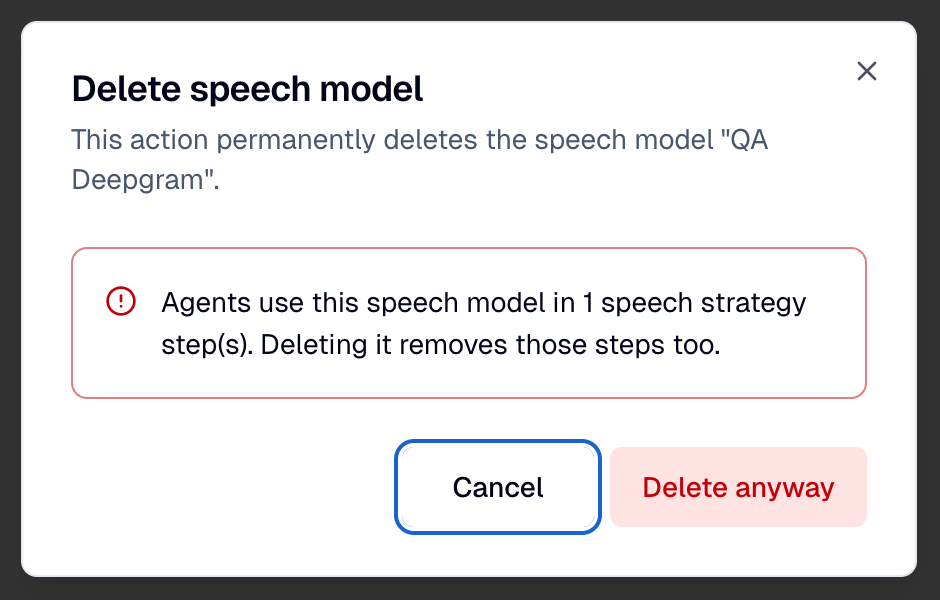
- In the Speech models table, open the options menu (⋮) on the row and click Delete.
- In the dialog, click Delete.
If an AI Agent uses the speech model in its voice settings, Moveo tells you how many voice settings use it. Click Delete anyway to delete the speech model. Moveo then removes the voice settings that use it from every AI Agent and every AI Agent version. A language that loses its voice setting uses the default option of its row again, for example Moveo default. If the primary language shows No default, select a new provider. See Default settings.
Data residency
For ElevenLabs, the Region of the speech model selects the endpoint for text-to-speech and
speech-to-text. For Deepgram, Soniox, MiniMax, and Rime, a speech model connects to the endpoint
that Moveo uses for the provider in your region. For Cartesia and Google, a speech model connects to
the default endpoint of the provider. A Moveo-hosted provider processes audio in the location that
Moveo set for your region. GET /v1/speech-models/providers returns this location in the region
field: us, eu, or in.
Permissions
To see the speech models of the account, a role needs Read only or Can edit on the Dev
tools group. To create, edit, or delete them, the role needs Can edit and the Edit speech
models permission. See Roles and permissions. An API key needs the manage
scope.
API reference
The REST API manages speech models with these endpoints:
GET /v1/speech-modelslists the speech models of the account, with masked keys.GET /v1/speech-models/providerslists the providers of the region, their STT and TTS models, and if Moveo hosts them for each kind (hosted.sttandhosted.tts). It also returns the Moveo defaults of the region indefaults.POST /v1/speech-modelscreates a speech model. Theconfigtakes anapi_key, orcredentialsfor Google.PUT /v1/speech-models/{speech_model_id}changes the name or theconfig.DELETE /v1/speech-models/{speech_model_id}deletes a speech model. If an AI Agent uses it, the API returns409 speech-model-in-use. Addforce=trueto delete it and remove the voice settings that use it.
See Create a speech model for the request and response schemas.
Next steps
To use a speech model, select it in the voice settings of an AI Agent. To tune the pronunciation and the speed of the voice, see Pronunciation and speech control.