Test a voice AI Agent
Test a voice AI Agent in two layers. Simulations test what the AI Agent says. Run them again after every change. Test calls test how the AI Agent sounds and hears on a real call.
Ways to test
| Method | What it tests | What it does not test |
|---|---|---|
| Test voice in the voice settings | The voice, the speed, and the pronunciation of a sample | The conversation |
| Simulation with Voice channel type | The replies, tools, handover, and context of the voice AI Agent | Audio, speech recognition, latency, and interruptions |
| Web Voice test call | The full speech pipeline from a browser | The phone network, handover, and call recording |
| Phone test call | The full call, with the phone network, transfer, and recording | Nothing. It is the same path as a customer call. |
Simulations for voice
Set Channel type to Voice in the simulation. The AI Agent then answers with its voice behavior and its voice guidelines. A simulation has no real call and no audio. Use it for regression tests of the replies, and use test calls for the sound. Simulations require a paid plan.
Web test call
A web test call needs a voice integration that accepts browser calls:
- Select a Web Voice integration in Voice mode of the web widget. Add the origin of your test page to Allowed origins. Then start the call with the voice button of the widget.
- A Twilio Voice integration without a phone number handles web calls only.
Phone test call
Call the phone number of the Twilio Voice or Telnyx Voice integration. To test an outbound call, add your own number to a test campaign. Test handover only on a phone call.
What to check
| Check | How to test it | If it fails |
|---|---|---|
| Response time | Ask a question that needs a tool or the knowledge base | See Latency |
| Interruptions | Speak while the AI Agent talks. Pause in the middle of a sentence. | See Turn-taking |
| Names | Say a name, a street, and a product name | Add terms in the speech-to-text row. See Pronunciation. |
| Numbers | Give a date, an amount, and a reference number | Use text normalization or spoken text. See Pronunciation. |
| Critical data | Give a wrong digit on purpose | Add a read-back rule to the voice guidelines |
| Language | Switch language in the middle of the call | See Languages and providers |
| Unclear input | Mumble, or stay silent | Add a recovery rule to the voice guidelines |
| Handover | Ask for a human | See Voice call transfer |
| End of call | Finish the task | Add a Pause before Resolve |
Review a call
Open the conversation in Logs, from Analytics or from the AI Agent.
- The transcript shows what the AI Agent heard and what it said, turn by turn.
- A reply that the caller cut off shows Response was interrupted.
- An outbound call to a voicemail shows Voicemail detected.
- With Store call recordings on in a Twilio Voice or Telnyx Voice integration, the log has a Call recording player. Use it to hear the voice and to compare the audio with the transcript. See Call recording.
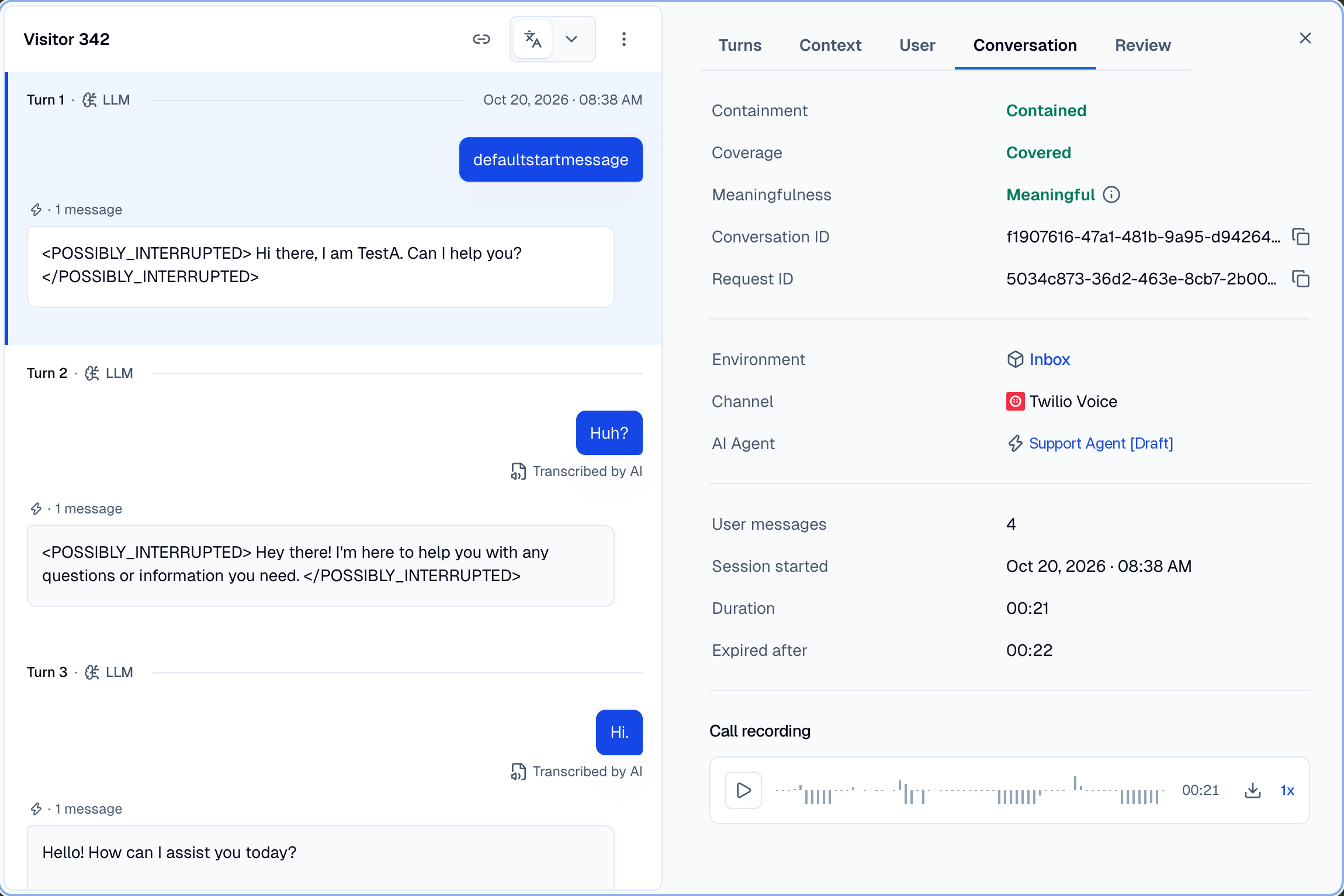
A word that is wrong in the transcript is a speech-to-text problem. A word that is right in the transcript but wrong in the audio is a text-to-speech problem.
Checklist
- The voice and the speed sound right in Test voice.
- Voice simulations pass for the main scenarios.
- The greeting plays at the start of the call.
- The AI Agent answers without a long silence.
- If you interrupt the AI Agent, it stops.
- Names, numbers, dates, and amounts are right in the transcript and in the audio.
- The AI Agent reads back critical data and waits for a yes from the caller.
- Each language of your callers works.
- Handover reaches the right number on a phone call.
- The last sentence plays completely before the call ends.
- The recording and the transcript show in Logs.