Turn-taking and interruptions
A voice AI Agent takes turns with the caller. It detects the end of each caller turn. It stops its reply on an interruption. Noise suppression cleans the caller audio. This page explains each behavior and the setting that controls it.
End of the caller turn
The speech-to-text model of the AI Agent sets how Moveo detects the end of the caller turn. You set the model and its turn settings in the speech-to-text row of the AI Agent voice settings. A call uses the speech-to-text settings of the primary language of the AI Agent.
There are two types of turn detection:
- Model turn detection. Deepgram Flux and Soniox detect the end of the turn themselves. The settings in the table below control the end of the turn.
- Moveo turn detection. For Deepgram Nova and ElevenLabs, Moveo detects the end of the turn. Moveo finds the end of speech, and a turn model then uses the sound of the speech to decide that the caller is done. When the turn model decides that the caller is not done, the turn ends after 3 seconds of silence.
| Model | Turn detection | Setting | Range | Default |
|---|---|---|---|---|
Deepgram flux-general-en, flux-general-multi | Model | Patience Threshold (eot_threshold). Higher waits longer. | 0.5 to 0.9 | 0.7 |
End-of-Turn Timeout (eot_timeout_ms) | 500 to 10,000 ms | 5,000 ms | ||
Soniox stt-rt-v5, stt-rt-v4 | Model | Max Endpoint Delay (max_endpoint_delay_ms) | 500 to 3,000 ms | 2,000 ms |
Soniox stt-rt-v5 | Endpoint Sensitivity (endpoint_sensitivity). Higher ends sooner. | -1 to 1 | ||
Deepgram nova-3, nova-2 | Moveo | No setting | ||
ElevenLabs scribe_v2_realtime | Moveo | VAD Silence Threshold (vad_silence_threshold_secs). The turn waits for this silence before it ends. | 0.3 to 3 s | 1.5 s |
If you do not change a setting, the default applies. A value outside the range also uses the default. For the effect of turn detection on response time, see Latency.
If the caller speaks again after the end of the turn, and before the reply starts to play, Moveo cancels the reply. It joins the words of the caller into one turn, and the AI Agent answers all of them.
Interruptions
The caller can talk over the AI Agent. This is also called barge-in.
- The caller starts to speak while a reply plays.
- Moveo waits for the first words of the caller. A cough or a noise without words does not stop the reply. With Deepgram Flux, the start of the turn that the model detects stops the reply.
- Moveo stops the text-to-speech of the current reply and clears the audio that waits to play.
- Moveo tells the AI Agent how much of the reply the caller heard.
- The words of the caller become the next turn, and the AI Agent answers them.
If the reply stops and the caller then says no words, the AI Agent answers the previous turn again.
Replies that the caller cannot interrupt
These replies always play to the end:
- The reply of the starting dialog at the start of a call.
- The opening message of a campaign call. To change it, use Interrupt the opening message in the voice settings of the campaign.
- A reply in a turn with a tool or webhook call, based on its interruption setting. See Tools and webhooks.
Moveo keeps what the caller says during such a reply. It sends the words to the AI Agent after the reply ends, marked as words that the caller said over the reply.
The Pause action does not stop interruptions. On voice, use it
before a Resolve or Handover action, so the caller hears the last sentence in full.
Tools and webhooks
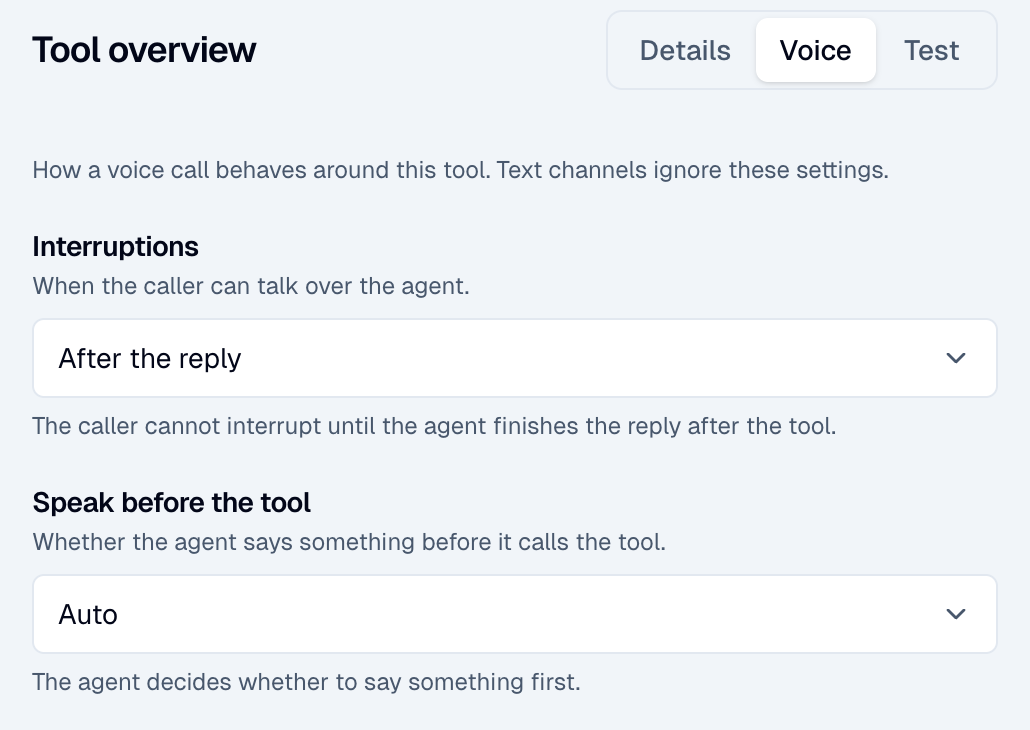
A tool call or a webhook can change data. An interruption in the middle of it can leave the caller and the AI Agent with different information. Each MCP tool and each action webhook has an interruption setting for voice. Text channels ignore it.
| Option | API value | Behavior |
|---|---|---|
| Any time | allow | The caller can talk over the AI Agent. An interruption cancels the turn, and the AI Agent does not keep the result of the call. |
| After the tool | disable_during_tool | On voice, this option works as After the reply. |
| After the reply | disable_during_tool_and_turn | The caller cannot interrupt the turn until the reply after the tool ends. This is the default. |
Use Any time only for a tool that is safe to run again, for example a lookup.
While a tool or webhook runs, the caller hears a waiting sound.
For an MCP tool, the Voice tab also has Speak before the tool:
- Auto (
auto, default): the AI Agent decides. - Always (
force): the AI Agent says a short line first, for example a request to wait. Use it for a slow tool. - Never (
off): the AI Agent calls the tool without speech. This is best effort. A long sentence can already be in progress at the start of the tool call.
Set these options on the Voice tab of the tool in the MCP server,
and in Interruptions on voice of an action webhook. In the
API, they are tool_settings of an MCP server and interruption_mode of a webhook.
Background noise and other speakers
Noise and other voices can start a false turn or a false interruption. These settings help:
- Noise suppression in the voice integration cleans the caller audio before speech-to-text. Moveo.AI runs on every voice integration, with the GTCRN (default) or Quail Voice Focus engine. Quail Voice Focus also reduces background voices. Telnyx Noise Suppression runs on Telnyx Voice only. If the Moveo.AI engine fails, the call continues with the original audio. See Telnyx Voice and Twilio Voice.
- Speaker Isolation (Soniox) transcribes only the primary speaker of the call. Endpoint detection is always on for Soniox, and it lowers the accuracy of speaker isolation.
- Patience Threshold (Deepgram Flux) sets the end-of-turn wait, not the loudness. It does not filter noise.
A noise without words does not interrupt a reply, except with Deepgram Flux. See Interruptions.
Who speaks first
AI Agent starts first in the Preferences of the voice integration controls the start of an inbound call. When it is on, the AI Agent says its welcome message when the call connects. When it is off, the AI Agent waits for the caller to speak first.
On a campaign call, the AI Agent says the opening message of the campaign. It waits until the person who answers is quiet.
Calls with no speech
After 5 minutes with no speech from the caller or the AI Agent, the call ends. The reminders of the Inactivity timeout action do not run on voice calls.
Symptom and setting to change
| Symptom | Setting to change |
|---|---|
| The AI Agent cuts the caller off. | Increase Patience Threshold or End-of-Turn Timeout for Flux. Increase Max Endpoint Delay, or lower Endpoint Sensitivity, for Soniox. |
| The AI Agent waits too long to answer. | Change the same settings in the other direction. For ElevenLabs, lower VAD Silence Threshold. See Latency. |
| The AI Agent talks over the caller. | Check the interruption setting of the tool or webhook in the turn. Use Interrupt the opening message for a campaign opener. |
| The caller cannot interrupt a reply. | For a tool or webhook that is safe to run again, set Any time. |
| Noise or other voices start a turn. | Turn on Noise suppression, or use the Quail Voice Focus engine. Turn on Speaker Isolation for Soniox. |