Authentication webhooks
Authentication uses webhooks for two distinct roles. Each role has its own dedicated webhook type — Authentication pre-enter and Authentication validation — that you pick in the wizard when creating the webhook. The Authentication setup dropdowns only list webhooks of the matching type, so you can't accidentally point a dialog-action webhook at an auth slot.
| Role | Webhook type | Where you select it in the console | When it fires | What it returns |
|---|---|---|---|---|
| Pre-enter webhook | auth_pre_enter | On the Verify the user step, the Pre-enter webhook dropdown | Once, when entering the verification step | Context updates to use as ground truth |
| Validation webhook | auth_validation | On any question, by setting Validate answer via to Webhook | Every time the agent submits a candidate answer for that question | A boolean accept / reject |
Pre-enter and validation are independent — you can use either, both, or neither. The most common production setup uses both: a validation webhook gates identification, then a pre-enter webhook fetches CRM data so verification can validate against it.
You can create as many auth_validation and auth_pre_enter webhooks per AI Agent as you need — typically one validation webhook per question, and one pre-enter webhook for the verification step.
Authentication webhooks are ordinary Moveo webhooks. The HTTPS request shape, the common body envelope, the request headers, signature verification, custom headers, retries, and fail-on-error semantics are the same as for every other type. This page documents what is auth-specific: the one extra request field and the response bodies. For everything else, see Build a webhook and Webhooks.
request_id is no longer in the request bodyAuthentication webhooks used to send a request_id field in the JSON body. They no longer do. Read the value from the X-Moveo-Request-Id header instead, which carries the same identifier and has always been sent on these calls. Update any receiver that parses the request id out of the body. In the same change, context is now projected the way it is for every other webhook type, so mirrored system variables such as sys-detected_language can appear where they previously did not.
Pre-enter webhook contract
Available only on the verification step. The Pre-enter webhook lets you fetch data once — typically from your CRM — so the verification questions can validate against it.
When it fires
Once, on the first turn after the verification step is entered. It does not re-fire on subsequent turns within the same step. If the pre-enter webhook fails (timeout, non-2xx response, malformed body), the auth flow exits with a system failure and routes to the configured failure node — the verification step never starts.
Request
POST with JSON body:
{
  "channel": "web",
  "channel_type": "messaging",
  "session_id": "8563dcdf-64ef-4de2-a5ca-b96e0557e4e8",
  "desk_id": "d3d08940-f0ef-42e0-993c-1bea065dcqwe",
  "integration_id": "",
  "brain_id": "d3d08940-f0ef-42e0-993c-1bea065dcqwe",
  "lang": "en",
  "context": { "/* all current context vars */": "..." },
  "timestamp": 1761045302529
}
The pre-enter webhook receives the common envelope and nothing else. context is the full set of variables collected so far, including any captured during identification (e.g. $ssn, $account_number) and the sys-* system variables. The request id is sent as the X-Moveo-Request-Id header, not as a body field.
Response
{
  "output": {
    "name": "Maria Papadopoulou",
    "dob": "1980-04-12"
  }
}
Every key/value in output is merged into the conversation context. The returned variables become available as $name, $dob, etc. — and can be referenced as the Ground truth for the verification questions (e.g. "Validate answer via Fuzzy match against $name").
Example
A pre-enter webhook that looks up a CRM record by SSN and returns the matching name and dob. The example below uses Next.js App Router and Zod; the same pattern applies to any HTTP framework.
- Node.js / Next.js
- Python (FastAPI)
import { NextResponse } from 'next/server';
import { z } from 'zod';

const bodySchema = z.object({
  session_id: z.string().optional(),
  context: z.object({
    ssn: z.string().min(1, 'context.ssn is required'),
  }),
});

export const POST = async (req: Request): Promise<Response> => {
  // The request id arrives as a header, not as a body field. Log it for correlation.
  const requestId = req.headers.get('x-moveo-request-id');
  const body = bodySchema.parse(await req.json());

  // Look up the CRM record by SSN. Replace with your own data source.
  const row = await lookupCrmRow(body.context.ssn);

  console.info('fetch-crm-data', { requestId, sessionId: body.session_id, found: row !== null });
  return NextResponse.json({ output: row });
  // row shape: { name: string, dob: string } | null
};
from fastapi import FastAPI, Header
from pydantic import BaseModel

app = FastAPI()

class Context(BaseModel):
    ssn: str

class Body(BaseModel):
    session_id: str | None = None
    context: Context

@app.post("/api/fetch-crm-data")
async def fetch_crm_data(
    body: Body,
    # The request id arrives as a header, not as a body field. Log it for correlation.
    x_moveo_request_id: str | None = Header(default=None),
) -> dict:
    row = lookup_crm_row(body.context.ssn)  # -> {"name": str, "dob": str} | None
    return {"output": row}
If the SSN doesn't resolve to a CRM record, return { "output": null } (or omit the ground-truth keys). The verification step will then fail every question that depends on them.
Validation webhook contract
Available per question when you set Validate answer via to Webhook. Use it when the right-answer check can't be expressed as a string operator against a context variable.
When it fires
Every time the agent submits a candidate answer for the question. The same webhook may be called multiple times in one step (if the user gives a wrong answer and tries again, that's a new call) and across both steps if you configure validation webhooks on both.
Request
POST with JSON body:
{
  "channel": "web",
  "channel_type": "messaging",
  "session_id": "8563dcdf-64ef-4de2-a5ca-b96e0557e4e8",
  "desk_id": "d3d08940-f0ef-42e0-993c-1bea065dcqwe",
  "integration_id": "",
  "brain_id": "d3d08940-f0ef-42e0-993c-1bea065dcqwe",
  "lang": "en",
  "context": { "/* all current context vars */": "..." },
  "timestamp": 1761045302529,
  "value": "123-45-6789"
}
The common envelope carries the conversation identifiers, and value is the one field the validation webhook adds on top of it.
valueis the candidate answer extracted by the agent — already normalized to the question'stype(e.g. for adatequestion, an ISO-formatted string).contextis the full set of variables collected so far. Use this if the validation depends on more than just the candidate value (e.g. validating an OTP against a previously sent one stored in$otp_token).- The request id is sent as the
X-Moveo-Request-Idheader, not as a body field.
Response
{ "valid": true }
…or { "valid": false }. There is no third state; missing or malformed valid is treated as a system error.
The Authentication Agent learns only the boolean. It does not learn why an answer was rejected. This is intentional — see What the Authentication Agent can see.
Example
A validation webhook that checks whether the SSN the user provided exists in a Google Sheet.
- Node.js / Next.js
- Python (FastAPI)
import { NextResponse } from 'next/server';
import { z } from 'zod';

const bodySchema = z.object({
  value: z.string().min(1, 'value is required'),
  session_id: z.string().optional(),
  context: z.record(z.string(), z.unknown()).optional(),
});

export const POST = async (req: Request): Promise<Response> => {
  // The request id arrives as a header, not as a body field. Log it for correlation.
  const requestId = req.headers.get('x-moveo-request-id');
  const { value } = bodySchema.parse(await req.json());

  // Replace with your own check against your source of truth.
  const valid = await ssnExists(value);

  console.info('identify-ssn', { requestId, valid });
  return NextResponse.json({ valid });
};
from fastapi import FastAPI, Header
from pydantic import BaseModel

app = FastAPI()

class Body(BaseModel):
    value: str
    session_id: str | None = None
    context: dict | None = None

@app.post("/api/identify-ssn")
async def identify_ssn(
    body: Body,
    # The request id arrives as a header, not as a body field. Log it for correlation.
    x_moveo_request_id: str | None = Header(default=None),
) -> dict:
    valid = ssn_exists(body.value)  # -> bool
    return {"valid": valid}
Signature verification
Authentication webhooks use the same HMAC-SHA256 signature scheme as every other Moveo webhook. The signature is in the X-Moveo-Signature header; the secret is the verification token you configured on the webhook in the UI.
See Build a webhook → Verify the signature for the full pattern with Node.js and Python examples.
The minimal examples on this page omit signature verification for brevity. Production webhooks must always verify the signature to confirm the request actually came from Moveo and wasn't tampered with.
Creating an authentication webhook
Open the AI Agent → Workflows → Webhooks → Create. The type selector groups webhooks into four categories — pick from the Authentication webhooks group:
- Authentication validation — validates a user's answer to an authentication question.
- Authentication pre-enter — runs before an authentication step to fetch ground truth values.
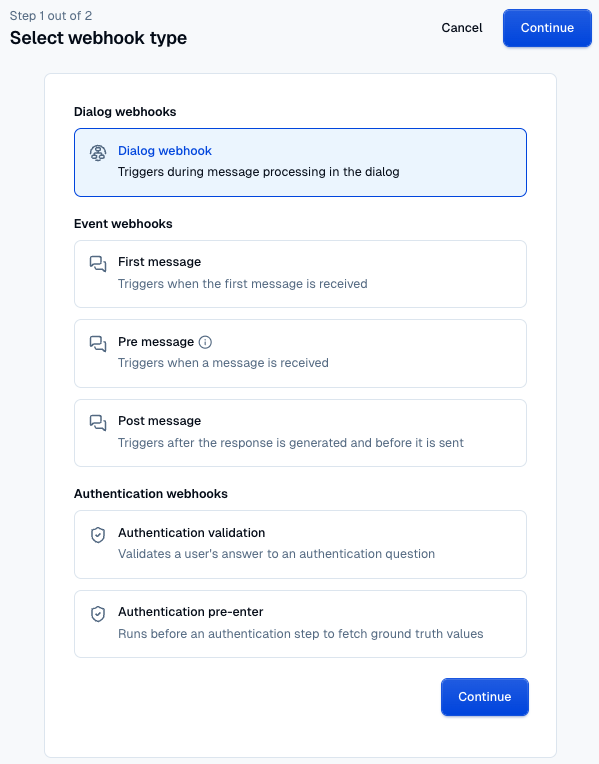
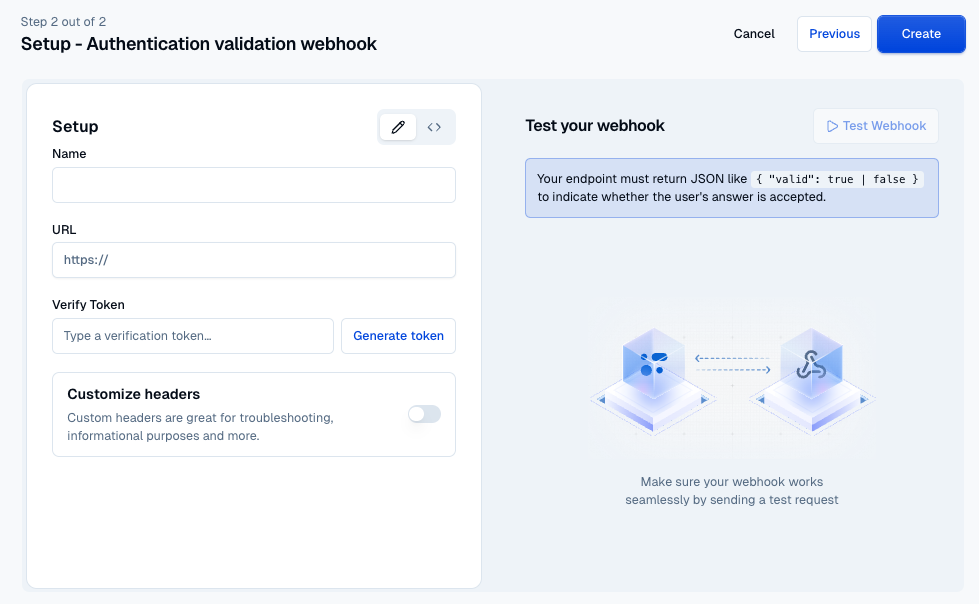
Then fill in the standard webhook form (name, URL, verification token, optional custom headers — see Webhooks). The wizard's Test panel shows the expected response shape for the type you picked, so you can build your endpoint against the right contract from the start.
Selecting a webhook in the console
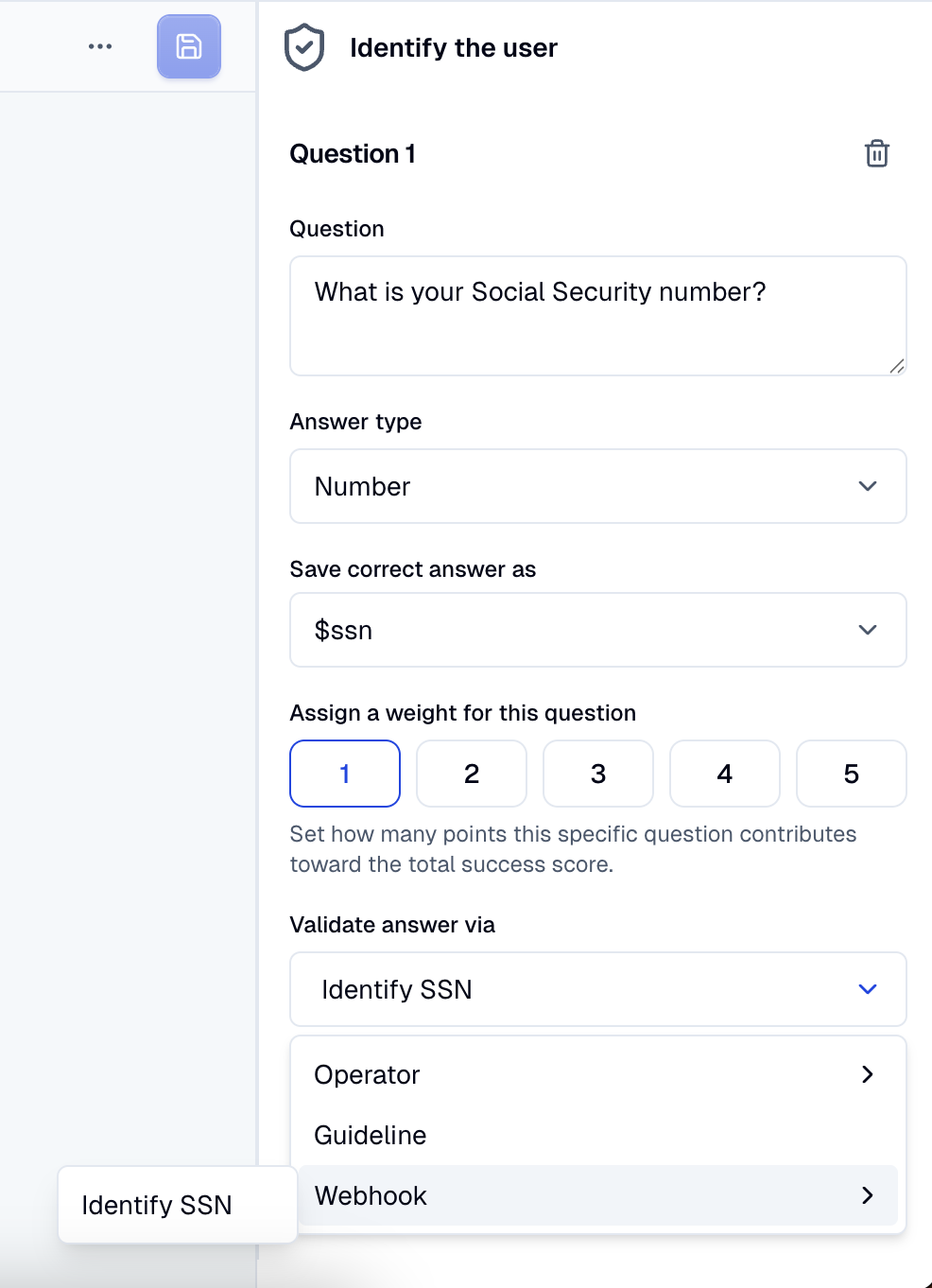
Once you've created the webhook, it becomes selectable on the Authentication action in exactly one place, determined by its type:
- Validation webhooks (
auth_validation) — appear on each question, when Validate answer via is set to Webhook. - Pre-enter webhooks (
auth_pre_enter) — appear in the Pre-enter webhook dropdown on the Verify the user step.
The dropdowns are strictly filtered: only webhooks of the matching type are listed. Dialog-action webhooks and event webhooks (first/pre/post message) are never offered for auth slots.
Deploying your webhook
Both webhooks just need a public HTTPS endpoint. The platform you deploy on is up to you — Vercel, Cloudflare Workers, AWS Lambda behind API Gateway, or your own infrastructure all work. The only constraint is that the endpoint must be reachable from Moveo's servers and respond within the webhook timeout.
A typical workflow:
- Implement and deploy the endpoint.
- In the webhook wizard, pick Authentication validation or Authentication pre-enter under the Authentication webhooks group, then fill in URL, verification token, and any custom headers — see Webhooks.
- Select it on the Authentication action: on a question for a validation webhook, or on the verification step's Pre-enter webhook dropdown for a pre-enter webhook. Each dropdown is filtered to its matching type.
- Test end-to-end in the Try It panel.
Type reference
Copy-paste-ready TypeScript types.
Both request types extend MoveoWebhookRequestBase, the common envelope defined in Build a webhook → Request bodies.
import type { MoveoWebhookRequestBase } from './moveo-webhooks';

// Pre-enter webhook
export type AuthPreEnterRequest = MoveoWebhookRequestBase;

export type AuthPreEnterResponse = {
  output: Record<string, unknown> | null;
};

// Validation webhook
export type AuthValidationRequest = MoveoWebhookRequestBase & {
  value: string;
};

export type AuthValidationResponse = {
  valid: boolean;
};
Putting it together: a CRM-backed two-step setup
The canonical real-world setup. Use this when your identifying credential (an SSN, a passport number) lives in a CRM and the rest of the user's record needs to come from the same source.
On the AI Agent's Webhooks page, configure two webhooks:
| Webhook | Type | Role | Returns |
|---|---|---|---|
| Identify SSN | auth_validation | Validation webhook for the identification question | { "valid": true } or { "valid": false } |
| Fetch CRM data | auth_pre_enter | Pre-enter webhook for the verification step | { "output": { "name": "...", "dob": "..." } } |
On the Authentication action (in a dialog node — see Setup), configure both steps:
-
Identify the user — enabled.
- One question: "What is your Social Security number?" (Number, weighted 1, saved as
ssn). - Validate answer via → Webhook → Identify SSN.
- Score threshold on Successful identification: 1.
- The Guidelines drawer carries the persona and compliance disclaimer the Authentication Agent will deliver on its first turn (the Authentication Agent owns the first turn — see Guidelines → Scripted greeting). The drawer also tells the user explicitly that they can ask to speak to a human at any time.
- On Identification exit, enable Guideline-based with the exit condition "The user asks to speak to a human." — that catches the affordance you just promised.
- Enable Incorrect responses (max 2) and Authentication timeout (5 minutes) as belt-and-braces.
- One question: "What is your Social Security number?" (Number, weighted 1, saved as
-
Verify the user — enabled.
- Pre-enter webhook → Fetch CRM data.
- Two questions:
- "What is your full legal name?" — Text, Validate answer via Fuzzy match against
$name, threshold 95. - "What is your date of birth?" — Date, Validate answer via Exact match against
$dob.
- "What is your full legal name?" — Text, Validate answer via Fuzzy match against
- Score threshold on Successful verification: 2 (both required).
-
Trigger node on success → a verified-customer dialog that picks up
$namein its greeting. -
Trigger node on exit → a handover dialog.
In the AI Agent's Settings, under Conversation start, set Starting dialog to the node holding the Authentication action, so the auth flow runs before anything else in the session.
What happens at runtime
- The conversation starts at the auth node — regardless of the user's first message. The Authentication Agent delivers the scripted greeting from the identification guideline and asks for the SSN.
- The user answers. The agent submits the SSN to the Identify SSN webhook. The webhook returns
{ "valid": true }if the SSN exists in the CRM, otherwise{ "valid": false }. - Once identification passes, the Fetch CRM data pre-enter webhook fires. It looks up the user record and returns
{ "output": { "name": "...", "dob": "..." } }. Those become available as$nameand$dob. - Verification asks for the user's full legal name and date of birth, validating each against the freshly-loaded ground truth.
- Both accepted → the success node fires, and the next dialog can greet the user by
$name. - At any point during identification, if the user says "speak to a human" (or similar), the failure guideline fires and the conversation routes immediately to the handover dialog — no need to burn through attempts.
Both webhooks can be backed by anything that exposes the data — a CRM API, a Google Sheet with name, ssn, dob columns, an internal microservice. The contract the brain cares about is just the JSON shapes documented above.
Where to next
- Build a webhook — generic signature verification, body validation, type reference.
- Webhooks — configuring URL, verification token, and custom headers on the AI Agent.