Inactivity reminder
The Inactivity timeout action sets a timer that triggers a reminder event node after a period of user inactivity. Use this to re-engage users who stop responding during a conversation.
How it works
When a user becomes inactive (stops sending messages), the inactivity timer counts down. After the specified duration, the system triggers a reminder event node that executes your configured flow.
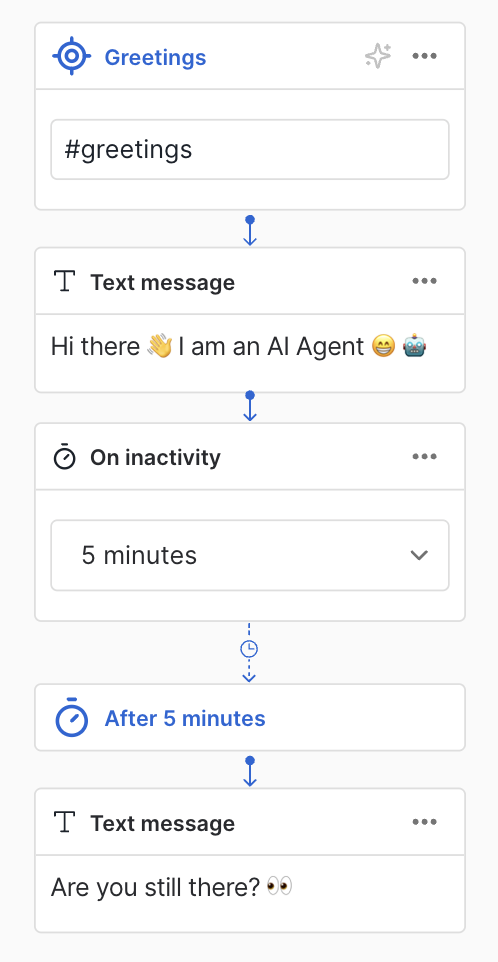
Configure an inactivity reminder
- Open your dialog in the editor
- Add an Inactivity timeout action to your flow
- Set the timeout duration (in seconds or minutes)
- Locate the reminder event node that Moveo creates and connects to the action
- Build the reminder flow under this node
Common use cases
Re-engage during checkout
Send a reminder if a user pauses during payment:
"Still there? I noticed you paused during checkout. Need help completing your order?"
Prompt for missing information
Nudge users to provide required details:
"I'm waiting for your email address to continue. You can type it whenever you're ready."
Offer assistance
Check if the user needs help:
"It looks like you might be busy. Feel free to come back anytime, or let me know if you need help!"
Canceling the timer
The inactivity timer automatically cancels when:
- The user sends a new message
- The conversation ends or closes
- A new inactivity reminder is set (replaces the previous one)
Next steps
- Handover action - Transfer conversations to human agents
- Tag action - Add tags for conversation routing
- Questions - Collect information from users